

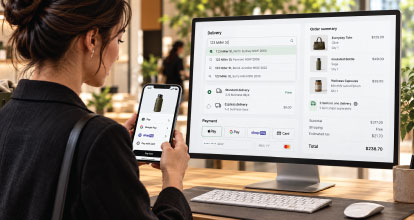
The checkout is one of the most commercially important parts of an eCommerce website.
A retailer can invest heavily in advertising, content, product photography, merchandising and customer acquisition, only to lose the sale during the final few minutes of the buying journey. Unexpected costs, unnecessary form fields, missing payment methods or a confusing delivery experience can quickly undermine everything that came before.
Great checkout design is not simply about making a page look clean. It involves reducing effort, supporting different purchasing scenarios, integrating payment and address technologies, capturing the right data and managing what happens after the order is placed.
This guide explores how retailers can design a faster, more flexible and higher-converting eCommerce checkout across mobile and desktop.
The role of the cart and checkout
The cart and checkout perform different jobs.
The cart helps customers review and adjust their intended purchase. The checkout converts that intention into a completed order.
A well-designed cart should allow customers to:
- Confirm products, variants and quantities
- Remove or update items
- Review estimated pricing
- Enter a promotional code, where appropriate
- Understand delivery thresholds
- See stock or availability information
- Identify subscription products
- Move directly into checkout
- Access express payment options
The checkout should focus on completing the transaction with as little friction as possible. It is not the right place to introduce complex merchandising, extensive cross-selling or unnecessary distractions.
Retailers should be careful not to make the cart feel like a second checkout. If customers enter the same information or make the same decisions in both places, the journey becomes repetitive.
The cart should build confidence and prepare the customer. The checkout should complete the transaction.
Reduce the number of checkout steps
Every additional step creates another opportunity for hesitation, confusion or abandonment.
This does not mean every checkout must appear on a single page. A dense, overwhelming page can be just as difficult to use as a long multi-step process. The objective is to make progress feel fast, logical and predictable.
Most checkouts need to collect:
- Customer contact details
- Delivery or pickup information
- Billing details, if different
- Shipping method
- Payment details
- Final order confirmation
These tasks can be presented on one page or divided into a small number of clearly labelled stages.
If a multi-step checkout is used, customers should always understand:
- Where they are
- What information is required
- What comes next
- Whether they can return to a previous step
- When they will be charged
Avoid vague buttons such as “Continue” when a more specific label can be used. “Continue to payment” or “Review order” gives the customer greater certainty.
Make guest checkout the default
Forcing customers to create an account before ordering is one of the most avoidable forms of checkout friction.
Account creation may benefit the retailer, but it rarely benefits a first-time customer enough to justify blocking the purchase. Customers may not want another password, may be buying only once or may simply want to finish their order quickly.
Guest checkout should be clearly available and, in many cases, treated as the default path.
Retailers can still create an account after the purchase by allowing the customer to set a password on the confirmation page or through a post-purchase email. Because the retailer already has much of the required information, this process can be significantly easier.
Returning customers should also be able to sign in without losing the contents of their cart or restarting checkout.
Offer the right payment methods
Payment choice directly affects conversion. Customers are more likely to complete an order when they recognise and trust the payment method available to them.
A modern Australian eCommerce checkout may include:
- Visa and Mastercard
- American Express
- PayPal
- Apple Pay
- Google Pay
- Shop Pay
- Buy now, pay later services
- Gift cards or store credit
- Account terms for approved B2B customers
- Direct deposit for selected transactions
Offering every payment method is not necessarily the right approach. Each option introduces commercial, technical and operational considerations, including transaction fees, reconciliation requirements, refund processes, fraud exposure and settlement timing.
Retailers should use payment data to understand which methods their customers actually use. They should also consider the expectations of their audience, average order value and product category.
A high-value furniture retailer may benefit from buy now, pay later services. A mobile-first fashion retailer may see greater value from Apple Pay and Google Pay. A B2B wholesaler may need purchase orders, account credit and invoice payment options.
The right payment mix is the one that removes genuine customer barriers without creating unnecessary operational complexity.
Use express checkout intelligently
Express checkout allows customers to bypass much of the traditional form-filling process by using payment and address details already stored with a trusted provider.
Common express checkout options include:
- Apple Pay
- Google Pay
- Shop Pay
- PayPal Express Checkout
These services can substantially reduce the time required to complete a purchase, particularly on mobile devices.
Express payment buttons should be easy to find, but their placement requires care. Presenting multiple brightly coloured buttons above the normal checkout can sometimes make the page feel cluttered or leave customers uncertain about which option to choose.
The standard checkout path must remain visible and understandable for customers who want to pay by card or another method.
Retailers should also test whether an express option supports all required purchase scenarios. Some integrations may behave differently when an order involves subscriptions, split shipments, store pickup, gift cards or products with delivery restrictions.
Apple Pay and Google Pay on mobile
Mobile checkout presents a unique set of challenges. Customers are working with a smaller screen, a virtual keyboard and often a less stable browsing environment.
Apple Pay and Google Pay can remove much of this friction.
Instead of manually entering a card number, expiry date, security code, name and address, customers may be able to authenticate the payment using Face ID, Touch ID, a passcode or their device’s biometric security.
Apple Pay is particularly valuable for customers using compatible Apple devices and browsers. Google Pay provides a similar benefit across supported Android devices and web environments.
Their effectiveness depends on correct implementation. Retailers should verify that:
- The correct express payment option appears on supported devices
- The payment button is placed prominently without dominating the page
- Stored delivery details are passed into checkout correctly
- Errors are explained clearly
- Discount codes and gift cards still work
- Shipping methods remain accurate
- Analytics correctly identify the payment method
- Refunds can be managed by the customer service team
Express payments should be tested on real devices, not only through desktop browser emulation.
The benefits of Shop Pay for Shopify retailers
Shop Pay is one of Shopify’s most valuable checkout features, particularly for returning customers.
Once a customer has saved their details with Shop Pay, Shopify can use that information to accelerate checkout across participating Shopify stores. The customer can retrieve their information using an email address or mobile number and complete the transaction without manually re-entering every field.
Potential benefits include:
- Faster checkout completion
- Reduced form entry on mobile
- Stored payment and delivery information
- A familiar experience across Shopify stores
- Easier repeat purchasing
- Strong alignment with Shopify’s native checkout
For eligible Shopify retailers, Shop Pay should be assessed alongside Apple Pay, Google Pay and PayPal rather than treated as a replacement for every other method.
It is also important to understand how Shop Pay interacts with subscriptions, Shopify Markets, local currencies, discounts and any customised checkout workflows.
Mobile and desktop checkout should not be identical
Responsive design does not mean shrinking the desktop checkout until it fits on a phone.
Mobile customers have different constraints and opportunities.
On mobile:
- Form fields should use the correct keyboard type
- Buttons should be large enough to tap comfortably
- Order summaries should be easy to expand
- Express payment options should appear early
- Address lookup should minimise typing
- Errors should appear next to the relevant field
- Customers should not need to zoom
- Sticky buttons may help customers continue
- Important costs should remain visible
- Returning to edit the cart should be simple
Desktop customers have more screen space and may benefit from seeing their form, order summary and delivery details at the same time. However, additional screen space should not be used to add unnecessary content or distractions.
Both experiences should preserve the same underlying pricing, shipping and payment logic, while presenting that information in a way suited to the device.
Use address lookup and validation technology
Entering an address manually creates both customer friction and operational risk.
Address lookup services such as Google Address Validation, Google Places Autocomplete and AddressFinder can help customers find and complete their address more quickly.
A well-implemented address lookup can:
- Reduce typing
- Prevent spelling mistakes
- Standardise address formats
- Improve shipping accuracy
- Reduce failed deliveries
- Support fraud checks
- Improve customer data quality
- Accelerate mobile checkout
The technology must be configured for the retailer’s delivery markets. An Australian retailer should ensure that unit numbers, level numbers, rural addresses, parcel lockers, business addresses and Australian postcode conventions are handled correctly.
Customers must also be able to enter an address manually. No address database is perfect, and new developments, unusual buildings or rural locations may not appear immediately.
Address validation should help the customer rather than prevent them from ordering.
Clearly communicate delivery costs and timeframes
Customers should not reach the final payment stage before discovering the true cost or timing of delivery.
Where possible, the cart should provide an estimated delivery cost or explain how shipping will be calculated. The checkout can then provide the final options once the customer’s address is known.
Each delivery method should clearly communicate:
- The price
- The expected delivery timeframe
- Whether the timeframe is an estimate
- The carrier or service type, where relevant
- Any regional or product restrictions
- Whether tracking is provided
- Whether authority to leave is available
Avoid presenting customers with internal logistics terminology. Delivery methods should be named in language customers understand.
If free shipping is based on a threshold, show how close the customer is to qualifying. This can increase average order value, but the message should remain helpful rather than obstructive.
Design for single-item and multi-item carts
A checkout must work equally well for a customer purchasing one product and another purchasing 20 products across different categories.
Single-item carts often suit a fast, highly streamlined checkout. The customer already knows what they want and may be ready to use an express payment method immediately.
Multi-item carts require more detailed review. Customers may need to confirm:
- Product quantities
- Sizes or variants
- Stock availability
- Delivery timing
- Backordered products
- Subscription frequency
- Gift messages
- Shipping destinations
- Promotion eligibility
The order summary should remain readable as the cart grows. On mobile, it may be collapsed by default, but customers must be able to expand it easily.
Totals should clearly distinguish between the subtotal, discounts, shipping, tax, gift cards, account credit and final amount payable.
Handle split shipments without creating confusion
Split shipments are common when products come from different warehouses, stores, suppliers or fulfilment partners. They may also occur when part of an order is available immediately and another item is on backorder.
The checkout must explain split delivery before payment.
Customers should understand:
- Why the order is being split
- Which products are included in each shipment
- Whether additional shipping costs apply
- The expected timing of each shipment
- How tracking will work
- Whether they can consolidate the order
- What happens if one item is delayed or cancelled
If customers can ship items to multiple addresses, the workflow becomes more complex. The interface should allow products to be assigned to addresses without losing quantities, variants or gift information.
Behind the scenes, the platform must pass accurate fulfilment instructions to the ERP, order management system, warehouse management system or third-party logistics provider.
This is an area where checkout design and systems integration must be considered together.
Support subscription purchases properly
Subscription checkout involves more than adding recurring billing to a standard product page.
Customers need to understand:
- The recurring price
- Billing frequency
- Delivery frequency
- Minimum commitment, if one applies
- The first payment date
- The next scheduled payment
- How to pause, skip or cancel
- Whether pricing can change
- How discounts apply
- Whether other products are one-off purchases
Mixed carts containing both subscription and one-time products require particular attention. The order summary must clearly identify which products will renew and which will not.
Some payment methods may not support recurring transactions in the same way as standard purchases. Retailers should confirm compatibility across card payments, wallets, buy now, pay later options and express checkout services.
Subscription terms should be explicit before the order is completed. Hiding key conditions may increase short-term conversion, but it will also increase cancellations, disputes and customer service costs.
Capture only the data you need
Every form field creates work for the customer.
Retailers should challenge whether each piece of information is truly required to process the order, prevent fraud, deliver the product or provide an agreed service.
Common unnecessary fields include:
- Date of birth
- Gender
- Secondary phone numbers
- Company name for consumer orders
- Delivery instructions when not supported
- “How did you hear about us?” questions
- Forced marketing preferences
- Account passwords before purchase
A phone number may be essential for delivery updates, but the reason for collecting it should be clear. Company and tax information may be necessary for B2B transactions but irrelevant to most consumers.
Optional fields should be labelled as optional. Mandatory and optional field behaviour should be consistent throughout checkout.
Marketing consent should also be handled separately from transactional requirements. A customer should not need to agree to promotional communication to complete a purchase.
Use checkout data to improve the experience
Checkout optimisation should be driven by evidence rather than personal preference.
Retailers should measure:
- Cart-to-checkout rate
- Checkout completion rate
- Abandonment by stage
- Field-level validation errors
- Payment failures
- Declined transactions
- Shipping method selection
- Payment method selection
- Mobile versus desktop conversion
- Express checkout usage
- Address lookup usage
- Average checkout completion time
- Subscription versus one-time conversion
Analytics should identify where customers leave without exposing sensitive personal or payment information.
Session recordings and user testing can also reveal problems that standard analytics may miss, such as confusing button labels, hidden errors or difficulty editing an address.
Checkout performance should be reviewed after platform updates, payment changes, shipping rule changes and major promotional events.
Handle payment errors properly
Payment failures are not always caused by insufficient funds. Transactions may fail because of incorrect details, fraud rules, expired sessions, technical timeouts or communication problems between the website and payment gateway.
A poor error message such as “Payment failed” gives the customer no useful path forward.
Where security requirements allow, the checkout should explain what the customer can do next:
- Check their payment details
- Try the payment again
- Select another payment method
- Contact their bank
- Return to the cart
- Contact customer service
The cart and entered checkout information should be preserved after a recoverable error. Customers should not have to rebuild their order because a payment attempt failed.
Retailers should also monitor gateway errors and payment decline patterns. A sudden increase may indicate a configuration problem rather than a change in customer behaviour.
Design the post-checkout experience
The customer journey does not end when payment succeeds.
A good post-checkout workflow confirms the order, sets expectations and gives the customer confidence that everything has worked correctly.
The order confirmation page should show:
- A clear success message
- The order number
- Purchased products
- Payment status
- Delivery address
- Shipping method
- Estimated delivery timing
- Subscription details, where relevant
- Instructions for tracking or managing the order
- Customer service contact details
The customer should also receive a transactional confirmation email. Depending on the order, subsequent communication may include payment confirmation, fulfilment updates, dispatch notifications, tracking details, pickup instructions, delay notices and delivery confirmation.
These workflows must align with the actual state of the order. Sending a dispatch email before the warehouse has accepted the order damages trust.
Post-purchase marketing can be valuable, but it should not overwhelm essential transactional information. The first priority is reassuring the customer and clearly communicating what happens next.
Connect checkout with the wider technology stack
Many checkout problems are not frontend problems.
Shipping availability may depend on inventory held in an ERP. Customer-specific pricing may come from a business system. Subscription details may be managed by an external application. Fraud decisions may be handled by a payment provider. Fulfilment may involve several warehouses or stores.
A checkout may look simple while relying on complex integrations below the surface.
Retailers should consider how checkout connects with:
- ERP platforms
- Order management systems
- Warehouse management systems
- Product information management systems
- Payment gateways
- Subscription platforms
- Fraud prevention services
- Tax calculation services
- Shipping carriers and aggregators
- CRM and marketing platforms
- Customer identity systems
- Analytics and reporting platforms
The customer experience is only successful if the data passed into these systems is complete, accurate and actionable.
Test real customer scenarios
Checkout testing should cover more than placing a standard order with one in-stock product.
Important scenarios include:
- A new customer using guest checkout
- A returning customer signing in
- A single-item order
- A large multi-item cart
- A mobile Apple Pay purchase
- A mobile Google Pay purchase
- A Shop Pay purchase
- A subscription-only order
- A mixed subscription and one-time order
- An order using a discount code
- An order using a gift card
- A split shipment
- A backordered product
- Store pickup
- An invalid or unusual address
- A declined payment
- A successful payment followed by an integration failure
- A refund or partial refund
- An international order
- A high-value order flagged for review
Testing should occur across real phones, tablets, desktop browsers and payment methods.
Automated testing can help identify regressions, but it should complement rather than replace human testing of the complete purchase experience.
Common eCommerce checkout mistakes
Retailers frequently lose conversion through avoidable decisions, including:
- Forcing account creation
- Hiding delivery costs until late in checkout
- Requesting unnecessary information
- Offering too few payment options
- Adding too many payment buttons without clear hierarchy
- Using vague validation messages
- Removing the customer’s cart after a payment error
- Failing to optimise forms for mobile
- Treating mobile as a smaller desktop experience
- Hiding subscription terms
- Failing to explain split shipments
- Adding distractions during checkout
- Sending incorrect post-purchase updates
- Changing checkout without properly testing integrations
- Measuring overall conversion without analysing checkout stages
Individually, some of these issues may appear minor. Together, they can have a material effect on revenue.
Building the right checkout experience
There is no single checkout design that is perfect for every retailer.
The right experience depends on the products being sold, the customer, average order value, payment preferences, fulfilment model, technology stack and complexity of the transaction.
A successful checkout should:
- Minimise effort
- Provide trusted payment choices
- Make costs clear
- Work exceptionally well on mobile
- Support express checkout
- Handle complex orders without confusing customers
- Capture only necessary information
- Communicate accurately after purchase
- Pass reliable data into operational systems
- Be continuously tested and improved
For some retailers, the greatest opportunity may be enabling Apple Pay, Google Pay or Shop Pay. For others, it may involve rebuilding shipping logic, improving address validation, simplifying a multi-step form or fixing the integrations that sit behind the checkout.
The best checkout feels simple to the customer, even when the technology supporting it is complex.
How OSE approaches eCommerce checkout design
OSE helps Australian retailers design and develop high-performing checkout experiences across Shopify, Shopify Plus and Adobe Commerce.
Our work considers the complete transaction, including the cart, checkout interface, payment methods, shipping logic, subscriptions, address technology, analytics, post-purchase workflows and integration with platforms such as ERP, PIM and order management systems.
Because checkout problems are often connected to systems below the surface, we assess both the customer experience and the operational architecture required to support it.
If your checkout is creating friction, limiting payment choice or failing to support the complexity of your business, OSE can help identify the highest-value improvements and develop a more effective path to purchase.