

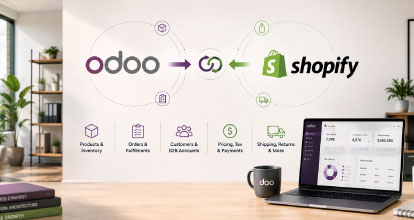
Odoo and Shopify can be a powerful combination for retailers, wholesalers and manufacturers that need strong operational management behind a modern eCommerce experience.
Odoo can manage many of the systems that sit behind an eCommerce business, including inventory, warehousing, purchasing, accounting, CRM, manufacturing and order management. Shopify, meanwhile, provides a highly scalable commerce platform designed around the customer experience.
The challenge is connecting the two correctly.
An Odoo Shopify integration is rarely just a matter of synchronising products and orders. Once a business has multiple warehouses, complex product data, B2B customers, customer-specific pricing, returns, partial fulfilments or multiple online stores, the integration becomes a critical part of the overall eCommerce architecture.
Businesses therefore need to think beyond simply asking:
“Can Shopify integrate with Odoo?”
The more important question is:
“How should Odoo and Shopify work together?”
In this guide, we look at how an Odoo Shopify integration can be structured, what data should be synchronised, where common integration problems occur, and how to design an architecture that can scale as the business grows.
Can Odoo Integrate with Shopify?
Yes.
Shopify can be integrated with Odoo using a number of different approaches, including:
- Pre-built Shopify and Odoo connectors
- Integration middleware
- Integration platforms
- Custom API integrations
- A combination of connector and custom integration services
The right approach depends heavily on the complexity of the business.
A relatively simple retailer with one Shopify store, one warehouse and standard product pricing may be able to use an existing connector successfully.
A larger retailer or B2B organisation may need considerably more sophisticated integration logic.
For example, the integration may need to support:
- Multiple Odoo warehouses
- Shopify Locations
- Customer-specific pricing
- Trade accounts
- Multiple price lists
- Multiple Shopify stores
- International stores
- Product restrictions
- Complex product attributes
- Bundles or kits
- Partial fulfilments
- Returns
- Purchase orders
- Payment terms
- ERP account balances
- Sales representatives
- Stock buffers
- Custom order workflows
At this point, the integration becomes less about moving data between two applications and more about defining how the overall commerce operation should function.
Why Use Shopify with Odoo?
One of the first questions businesses should ask is why Shopify is being introduced when Odoo already has eCommerce capabilities.
For some businesses, running the entire environment within Odoo may be perfectly appropriate.
For others, there is value in separating the customer-facing commerce experience from the systems running the operational side of the business.
A common architecture is:
Shopify
Customer experience, online merchandising, checkout, promotions and digital commerce
↓
Integration Layer
↓
Odoo
ERP, inventory, warehouses, purchasing, accounting, manufacturing and operational processes
This allows each platform to focus on its strengths.
Shopify can become the primary digital commerce platform while Odoo remains the operational backbone of the business.
This approach can be particularly attractive to businesses that want access to Shopify’s commerce ecosystem, extensive application marketplace, developer community and ability to support both B2C and B2B commerce.
The Most Important Decision: Which System Owns the Data?
One of the biggest mistakes we see in ERP and eCommerce integrations is failing to establish which system is responsible for each type of data.
This is sometimes described as establishing the system of record.
For example:
| Data | Likely System of Record |
|---|---|
| SKU | Odoo |
| Inventory | Odoo |
| Cost price | Odoo |
| Customer-facing product title | Shopify or PIM |
| Product description | Shopify or PIM |
| Product imagery | Shopify, DAM or PIM |
| Retail pricing | Odoo or Shopify |
| Customer-specific pricing | Odoo |
| Orders | Shopify initially, Odoo operationally |
| Fulfilments | Odoo |
| Payment status | Shopify |
| Accounting | Odoo |
There is no universal answer.
The correct ownership model depends on how the organisation operates.
However, ownership needs to be deliberately designed before development begins.
If both Shopify and Odoo can independently update the same field, the business can quickly end up with conflicting information.
A good integration architecture should make it clear:
- Where data originates
- Where it can be changed
- Which system is authoritative
- Which direction the data should flow
- How conflicts are resolved
This is one of the most important outcomes of an eCommerce discovery process.
Integrating Products Between Odoo and Shopify
Product integration sounds straightforward until the product catalogue becomes complicated.
At its simplest, Odoo may send Shopify:
- SKU
- Product name
- Barcode
- Price
- Inventory
- Product status
However, modern eCommerce catalogues often require substantially more information.
Products may also need:
- Long descriptions
- Short descriptions
- Technical specifications
- Product attributes
- Dimensions
- Weight
- Brand
- Category
- Collections
- Tags
- SEO information
- Product imagery
- Videos
- Downloads
- Compatibility information
- Related products
- Replacement products
- Frequently bought together products
- Metafields
The important question is whether Odoo is the appropriate system for maintaining all of this information.
In many organisations, it isn’t.
Odoo may be excellent at managing the operational product record but may not contain sufficiently rich product information for eCommerce.
In this situation, a business might use:
Odoo
for core ERP product data
for enriched product content
Shopify
for merchandising and the online customer experience.
Trying to force every piece of eCommerce product information into the ERP can make product management unnecessarily difficult.
Product Variants
Product variants require particularly careful mapping.
A product in Odoo might contain multiple variations such as:
- Size
- Colour
- Material
- Pack size
- Length
- Finish
- Configuration
These need to map correctly to Shopify products, options and variants.
Each sellable variant should generally have a reliable unique identifier, normally the SKU.
Businesses should avoid relying on product names as identifiers.
Product names change.
SKUs generally should not.
A good product integration should also account for what happens when:
- A new variant is created
- A variant is discontinued
- A SKU changes
- An option is renamed
- A product is temporarily unavailable
- A product should remain visible but cannot be purchased
These scenarios need to be defined rather than left to the connector to interpret.
Odoo Categories vs Shopify Collections
ERP category structures are often designed around internal business requirements rather than how customers shop.
An Odoo category hierarchy might reflect:
- Accounting groups
- Purchasing groups
- Supplier structures
- Product departments
- Internal reporting structures
That does not necessarily make it the right structure for Shopify.
The eCommerce category architecture should generally be designed around the customer.
Shopify Collections may therefore need to be maintained independently or generated using product attributes rather than simply replicating the Odoo category tree.
For example, Odoo might classify a product internally as:
Automotive > Components > Suspension > Group 143
While a customer may expect to browse:
4WD Suspension > Lift Kits > Toyota LandCruiser
The data can still originate in Odoo, but the digital merchandising structure does not have to mirror the ERP.
Product Data Quality Matters
An Odoo Shopify project is also a good opportunity to review the quality of the organisation’s product data.
Many businesses discover during an eCommerce implementation that years of ERP data entry have resulted in:
- Inconsistent product names
- Missing attributes
- Poor category structures
- Incorrect dimensions
- Missing imagery
- Duplicate products
- Inconsistent brands
- Poorly formatted descriptions
- Missing SKUs or barcodes
This data may be sufficient for internal ERP operations but not ready for a modern eCommerce environment.
We refer to this as eCommerce-ready product data.
Before migrating thousands of products into Shopify, it can therefore be worthwhile cleaning and restructuring the product information first.
Better product data improves:
- Customer navigation
- Site search
- Product filters
- SEO
- Google Shopping feeds
- AI search visibility
- Internal merchandising
- Marketplace integrations
A Shopify implementation should not simply expose poor ERP data to customers more efficiently.
Inventory Synchronisation
Inventory is one of the most important parts of an Odoo Shopify integration.
The basic model is:
Odoo inventory → Shopify inventory
However, the actual calculation can become much more complicated.
Shopify may need to understand inventory across:
- Multiple warehouses
- Retail stores
- Distribution centres
- Third-party logistics providers
- Drop-ship suppliers
The business must determine what stock Shopify should actually display as available for sale.
For example:
Odoo physical stock = 100
Allocated to existing orders = 20
Safety stock = 10
Available to Shopify = 70
This concept is often referred to as available-to-sell or available-to-promise inventory.
Sending raw physical stock directly to Shopify may create overselling if the ERP already has inventory committed elsewhere.
Multiple Warehouses and Shopify Locations
Businesses using multiple Odoo warehouses need to decide how these map into Shopify Locations.
A simple one-to-one relationship may work:
Odoo Brisbane Warehouse → Shopify Brisbane Location
Odoo Sydney Warehouse → Shopify Sydney Location
Odoo Melbourne Warehouse → Shopify Melbourne Location
But the real-world logic can become more complicated.
Questions may include:
- Can online orders be fulfilled from every warehouse?
- Are some warehouses wholesale only?
- Can retail stores fulfil online orders?
- Can customers click and collect?
- Should stock from two warehouses be combined?
- Which warehouse gets priority?
- Can one order be split across multiple locations?
- Is there a minimum stock threshold?
- Should stores retain stock for walk-in customers?
These decisions should be made as part of the commerce architecture rather than simply accepting the connector’s default behaviour.
Stock Synchronisation Frequency
Another consideration is how quickly inventory needs to update.
For some businesses, synchronising stock every few minutes is acceptable.
For businesses selling fast-moving or low-stock products, that may be too slow.
The integration architecture therefore needs to consider:
- Inventory volumes
- Order volumes
- API limitations
- Update frequency
- Webhooks
- Queue processing
- Error handling
High-volume businesses may benefit from event-driven integrations rather than repeatedly synchronising the entire catalogue.
Sending Shopify Orders to Odoo
Orders will generally originate in Shopify and then be sent to Odoo for operational processing.
A Shopify order may need to create or update:
- Customer
- Sales order
- Order lines
- Shipping method
- Discounts
- Taxes
- Payment status
- Delivery address
- Billing address
- Customer reference
- Purchase order number
The key is determining how each Shopify concept maps into Odoo.
Discounts are a good example.
Shopify might allow:
- Discount codes
- Automatic discounts
- Line-level discounts
- Order-level discounts
- Free shipping
- Gift cards
Odoo needs to understand how these should appear operationally and financially.
The integration therefore needs to map not only the order value, but the commercial logic behind the order.
Customers and Customer Accounts
For straightforward B2C commerce, customer integration may be relatively simple.
A customer places an order in Shopify and a customer record is created or updated in Odoo.
B2B commerce is considerably more complicated.
A trade customer might have:
- A company account
- Multiple users
- Multiple delivery addresses
- Customer-specific pricing
- Payment terms
- Credit limits
- Assigned sales representatives
- Product restrictions
- Different catalogues
- Account approval requirements
This is where Shopify Plus B2B functionality combined with Odoo can become particularly interesting.
Shopify Plus B2B and Odoo
For businesses using Shopify Plus, Shopify B2B can provide the customer-facing trade portal while Odoo remains responsible for much of the commercial data behind the account.
The integration may need to map:
Odoo customer
to
Shopify Company
and potentially:
Odoo delivery addresses or account locations
to
Shopify Company Locations
This architecture can support B2B functionality such as:
- Customer-specific catalogues
- Custom pricing
- Payment terms
- Company users
- Multiple locations
- Purchase orders
- Trade ordering
The business still needs to decide where each type of information is controlled.
For example, customer pricing might originate from Odoo while Shopify is responsible for presenting that price to the customer.
Customer-Specific Pricing
Pricing is often one of the most challenging elements of a B2B integration.
Odoo may contain:
- Standard retail price
- Wholesale price
- Customer price lists
- Customer group pricing
- Contract pricing
- Promotional pricing
- Quantity-based pricing
The integration needs to determine which pricing rules must exist in Shopify.
There are two broad strategies.
Synchronise Prices Into Shopify
Odoo calculates the applicable prices and sends them to Shopify.
This can provide fast storefront performance because the prices already exist within Shopify.
However, synchronising large volumes of customer-specific pricing can become complicated.
Request Pricing Dynamically
Shopify requests a price from an integration layer or Odoo when required.
This can support more complex ERP pricing logic but introduces additional technical dependencies and performance considerations.
The appropriate model depends on the complexity of the pricing structure and the number of customers and products involved.
Payment Terms and Credit Customers
B2B customers may not pay online at checkout.
Instead, they may purchase using:
- 7-day terms
- 14-day terms
- 30-day terms
- Credit accounts
- Purchase orders
The Odoo Shopify integration needs to ensure the correct payment terms are available to the correct customers.
Some organisations may also want to expose ERP information in Shopify such as:
- Credit limit
- Available credit
- Outstanding balance
- Overdue invoices
This can create a much richer self-service B2B portal.
However, it also means Shopify is no longer simply an order-taking website.
It becomes a customer-facing interface into the ERP.
Fulfilment Integration
After the order reaches Odoo, fulfilment information normally needs to flow back to Shopify.
This might include:
- Fulfilment status
- Shipment date
- Tracking number
- Carrier
- Partial fulfilments
Partial fulfilments deserve particular attention.
A customer may order five items, but Odoo may fulfil:
Three items from Brisbane
and
Two items from Sydney.
Shopify needs to reflect the correct fulfilment status and tracking information for each shipment.
The integration therefore needs to understand order lines, quantities and fulfilment events rather than simply setting an entire order to “fulfilled.”
Returns and Refunds
Returns can become one of the more complex parts of an integration.
A customer might request a return through Shopify, customer service, a retail store or directly through the ERP.
The organisation needs to determine:
- Where returns are initiated
- Which system approves the return
- How returned stock is handled
- How the refund is processed
- How Shopify is updated
- How Odoo accounting is updated
Refunds can also be partial.
For example, an order worth $500 may have one $100 item returned.
Both systems need to remain financially aligned.
Returns are often overlooked during early integration discussions because teams focus primarily on the initial purchase journey.
That can create significant operational problems after launch.
Gift Cards
Gift cards in eCommerce solutions are another area which requires careful consideration.
If Shopify controls gift cards, Odoo may need to understand how a gift card payment appears when the order enters the ERP.
This becomes even more important for retailers operating physical stores.
The business may want a gift card that can be:
- Purchased online
- Purchased in store
- Redeemed online
- Redeemed in store
In these situations, gift card ownership may need to sit outside either Shopify or Odoo within a dedicated gift card platform.
The overall commerce architecture should therefore consider all sales channels, not just the website.
Shipping Integration
Shipping information may come from several possible systems.
For example:
Shopify may calculate shipping rates.
Odoo may determine fulfilment location.
A shipping platform may generate labels.
A carrier may provide tracking.
The integration architecture needs to ensure these systems work together.
For more complex retailers, the order journey may look something like:
Shopify
Order placed
↓
Odoo
Order allocated to warehouse
↓
Shipping platform
Consignment created
↓
Carrier
Tracking generated
↓
Odoo
Fulfilment updated
↓
Shopify
Customer receives shipping confirmation
The more systems involved, the more important integration monitoring becomes.
Multi-Store Shopify Environments
Some businesses operate more than one Shopify store.
For example:
- Australian B2C store
- New Zealand B2C store
- Australian B2B store
- Brand-specific stores
- International stores
All of these stores may connect back into the same Odoo environment.
This creates additional integration considerations.
The integration needs to identify:
- Which Shopify store created the order
- Which warehouse should fulfil it
- Which price list applies
- Which currency applies
- Which accounting entity receives the revenue
- Which product catalogue belongs to the store
This is one of the areas where simple point-to-point connectors can begin to struggle.
Connector vs Middleware vs Custom Integration
There are several ways to architect an Odoo Shopify integration.
The right approach depends on business complexity.
Option 1: Pre-Built Odoo Shopify Connector
A connector provides predefined synchronisation between Odoo and Shopify.
This may include:
- Products
- Inventory
- Orders
- Customers
- Fulfilments
Advantages
- Faster implementation
- Lower upfront cost
- Existing functionality
- Less custom development
Limitations
- Business processes may need to fit the connector
- Custom logic may be limited
- Advanced B2B requirements may require modification
- Multi-store architectures can become more complicated
- Upgrades need to be considered
A connector can be an excellent option when the organisation’s requirements align closely with what the connector already supports.
Option 2: Middleware or Integration Platform
Middleware sits between Shopify and Odoo.
Instead of:
Shopify ↔ Odoo
the architecture becomes:
Shopify ↔ Middleware ↔ Odoo
This can be valuable when several systems need to communicate.
For example:
Shopify
↓
Integration layer
↙ ↓ ↘
Odoo PIM 3PL
Middleware can handle:
- Data transformation
- Routing
- Queueing
- Logging
- Error handling
- Business rules
This approach can make integrations easier to maintain as the digital ecosystem grows.
Option 3: Custom Odoo Shopify Integration
A custom integration gives the organisation maximum control.
It can be designed specifically around the business’s:
- Product architecture
- Pricing model
- Warehousing
- B2B requirements
- Order workflows
- Multi-store environment
The downside is that the organisation owns more custom software.
That means documentation, monitoring and long-term support become critical.
Custom integration should therefore be used where it creates genuine business value rather than simply because custom development is possible.
Hybrid Integration
In many cases, the best solution is a hybrid.
A business might use an existing connector for standard processes such as:
- Products
- Orders
- Customers
while adding custom integration logic for:
- B2B pricing
- Complex inventory
- Credit limits
- Multi-store routing
- Custom fulfilment workflows
This can reduce development effort without forcing the entire business into the limitations of a standard connector.
Odoo Online vs Odoo.sh vs Self-Hosted Odoo
The way Odoo is hosted can also affect integration options.
Businesses may be using:
- Odoo Online
- Odoo.sh
- Self-hosted Odoo
Different connectors and integration approaches can have different deployment requirements.
This should be checked early in the project.
It is particularly important if the planned integration requires:
- Custom Odoo modules
- Server-side code
- Additional libraries
- Custom API endpoints
- Scheduled processes
A connector that works perfectly in a self-hosted Odoo environment may not necessarily suit Odoo Online.
Integration Monitoring Is Essential
One of the biggest differences between a basic integration and an enterprise-grade integration is monitoring.
Integrations fail.
APIs time out.
Products contain unexpected data.
Orders may reference invalid addresses.
A service may temporarily become unavailable.
The important question is not whether an error will eventually occur.
It is whether the business knows when it occurs.
A good integration should provide:
- Transaction logging
- Error logging
- Retry mechanisms
- Failed transaction queues
- Notifications
- Integration dashboards
- Traceable transaction IDs
For example, if an order fails to reach Odoo, the business should be able to identify:
- Shopify order number
- Time of failure
- Error message
- Payload
- Retry status
Without this visibility, integration problems often become customer service problems before the technical team even knows something has failed.
Avoiding Real-Time Integration Everywhere
It is tempting to make every integration real time.
That is not always necessary.
Different data has different urgency.
For example:
Orders
Usually near real time.
Inventory
Potentially near real time.
Tracking information
Event based.
Product descriptions
May only need periodic synchronisation.
Cost pricing
May never need to reach Shopify.
Designing the integration around business requirements rather than assuming everything needs instant synchronisation can create a simpler and more resilient architecture.
API Limits and Scalability
Integration architecture should also consider what happens when the business grows.
For example, an integration that works for 5,000 products, 100 orders per day and one Shopify store, may behave very differently with 100,000 products, 5,000 orders per day and five Shopify stores.
The integration needs to account for:
- API limits
- Queue processing
- Bulk operations
- Webhooks
- Retry behaviour
- Processing time
- Database performance
Scalability should therefore be considered during the original architecture rather than after the integration starts failing under load.
Common Odoo Shopify Integration Mistakes
There are several recurring mistakes businesses should avoid.
Treating Integration as a Plugin Installation
Installing a connector does not define the business architecture.
The organisation still needs to determine:
- Data ownership
- Pricing rules
- Inventory logic
- Fulfilment logic
- Error handling
Replicating the ERP Structure Online
Your Odoo product or category structure may not be suitable for customers.
Shopify should be designed around how customers browse and buy.
Synchronising Too Much Data
Not every field in Odoo needs to exist in Shopify.
Only synchronise information that has a genuine use.
Ignoring Returns
Teams often design the integration around orders but forget returns, refunds and cancellations.
No Monitoring
A silent integration failure can result in:
- Missing orders
- Incorrect stock
- Customer service issues
- Accounting discrepancies
Allowing Both Systems to Own the Same Data
Two-way synchronisation should only be used where it is genuinely required.
Clear ownership is usually safer.
Choosing the Connector Before Defining Requirements
The business should define the required architecture first.
Only then should it determine whether a connector, middleware or custom integration is the most appropriate implementation approach.
The Importance of Discovery
For complex Odoo Shopify projects, integration design should happen before development begins.
A discovery process can define:
- Current systems
- Future systems
- Data ownership
- Integration flows
- Product structure
- Pricing
- Customers
- Inventory
- Warehouses
- Orders
- Fulfilments
- Returns
- B2B requirements
- Integration monitoring
This can then be represented in an integration architecture.
For example:
Odoo
Products
Inventory
Customers
Pricing
Orders
Fulfilments
↓
Integration Layer
Data mapping
Transformation
Queues
Monitoring
Business rules
↓
Shopify
Commerce experience
Products
B2B companies
Checkout
Orders
Customer accounts
Designing this before development significantly reduces the chance of discovering major architectural problems halfway through the implementation.
When Does an Odoo Shopify Integration Need a Specialist?
A simple Odoo Shopify connection can often be implemented using an existing connector.
Specialist integration expertise becomes more valuable when the business has:
- Complex ERP data
- Multiple warehouses
- Multiple stores
- High order volumes
- B2B customers
- Contract pricing
- Multiple price lists
- Complex fulfilment
- Product information systems
- Retail stores
- Third-party logistics
- Multiple business entities
At this level, the project is no longer simply about connecting Odoo and Shopify.
It is about designing an end-to-end commerce architecture.
Final Thoughts
Odoo and Shopify can work extremely well together.
Shopify can provide the customer-facing commerce platform while Odoo manages the operational systems behind the business.
But the success of the solution depends heavily on how the integration is designed.
The strongest implementations start by defining the role of each platform.
Which system owns product data?
Where does pricing come from?
How is available inventory calculated?
How are Shopify Locations mapped to Odoo warehouses?
Where are returns processed?
How are B2B customers represented?
What happens when an integration transaction fails?
Answering these questions before development begins creates a much more scalable and maintainable solution.
For relatively straightforward businesses, an existing Odoo Shopify connector may provide everything required.
For organisations with multiple warehouses, B2B commerce, customer-specific pricing, multiple stores or complex operational workflows, a more considered integration architecture may be required.
The objective should not simply be to make Shopify and Odoo exchange data.
It should be to make them operate as a single commerce ecosystem.
At OSE, we design and develop Shopify integrations for businesses with complex ERP, product, inventory and order management requirements. If your organisation is considering Shopify alongside Odoo, we can help define the integration architecture, data ownership and implementation approach before development begins.