
Choosing a B2B eCommerce platform starts with understanding how your wholesale or distribution business operates. Customer-specific pricing, account terms, product catalogues, stock availability and ERP integration all influence which platform will fit your requirements.
Shopify Plus and Adobe Commerce are two options worth evaluating, but the right choice depends on how each will support your customers and business processes and the configuration, integration and ongoing development required.
This guide compares both platforms against the practical requirements of wholesalers and distributors, helping you identify what to assess before committing to an implementation.
Why B2B eCommerce platform selection matters
B2B customers need an efficient way to place orders, access their account pricing and check availability. For wholesalers and distributors, the platform must support those tasks while keeping online activity aligned with internal systems and business rules.
When the platform fits those requirements, customers can manage routine purchasing independently, and sales and customer service teams can spend less time handling manual orders and enquiries.
A poor fit creates operational friction. Pricing discrepancies, unreliable stock information and disconnected order processes can force teams into workarounds and undermine customer confidence in the online channel.
Platform selection should therefore consider both the buying experience and the operational requirements behind it. Account structures, pricing rules, ERP integration and fulfilment processes should inform the decision from the outset.
Shopify Plus or Adobe Commerce: Where to Start
Assess both platforms against your essential business requirements before comparing implementation proposals.
| If your priority is… | Focus your assessment on… |
|---|---|
| Reducing platform maintenance | Hosting responsibilities, upgrades, app dependencies and ongoing support. |
| Supporting complex trade accounts | Buyer permissions, purchasing approvals, credit terms and account structures. |
| Maintaining customer-specific pricing | How ERP pricing rules will be represented, synchronised and tested. |
| Managing different catalogues and sales channels | Product visibility, account-specific ranges and B2B/B2C requirements. |
| Connecting multiple operational systems | Available interfaces, middleware, data ownership and error handling. |
A useful comparison should distinguish what each platform provides as standard, what requires additional software and what needs custom development. Validate those differences against your actual workflows before selecting a platform.
What makes B2B eCommerce different from B2C?
B2C eCommerce is usually built around anonymous or individual customers, standard pricing, public catalogues and immediate payment.
B2B eCommerce is more complex.
A B2B platform may need to support:
- Company accounts.
- Multiple buyers under one customer account.
- Customer-specific pricing.
- Contract pricing.
- Customer-specific catalogues.
- Trade payment terms.
- Purchase order numbers.
- Credit limits.
- Account approvals.
- Buyer roles and permissions.
- Order approval workflows.
- Quick order forms.
- Requisition lists.
- Repeat ordering.
- Order history.
- Invoice access.
- Backorders.
- Multi-warehouse stock.
- Sales rep visibility.
- ERP integration.
- PunchOut or procurement integration.
This is why platform selection matters.
The front-end website may look simple, but the business rules underneath are often complex.
What wholesalers and distributors need from a B2B platform
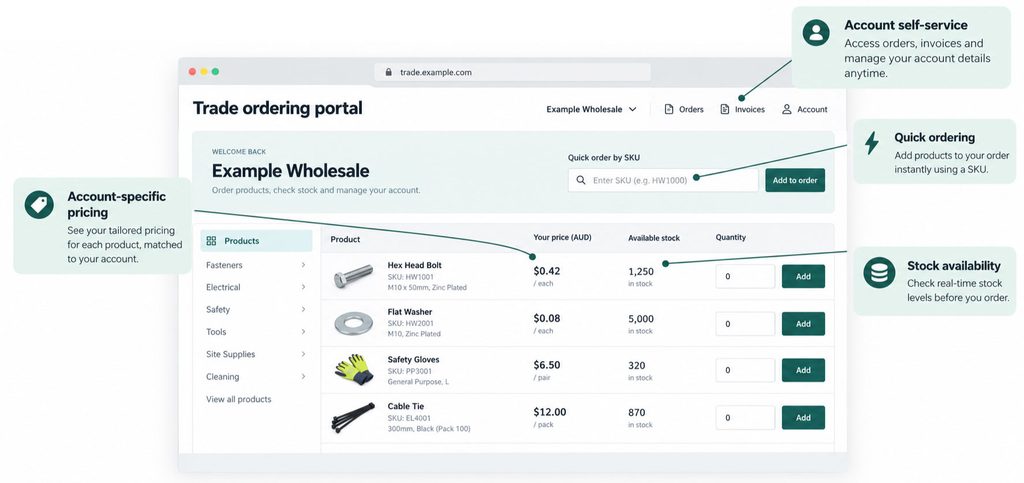
Wholesalers and distributors usually need more than a clean product catalogue.
They need a platform that supports repeat purchasing, account relationships and operational accuracy.
The most important requirements usually include the following.
1. Customer account management
B2B customers are often companies, not individuals.
That means the platform needs to support company accounts, multiple users, account roles and buying permissions.
A customer may have:
- An account owner.
- Buyers.
- Approvers.
- Finance users.
- Site managers.
- Branch users.
- Sales reps.
The platform should allow the business to control who can order, who can approve, who can view invoices and who can manage account details.
Adobe Commerce supports company accounts with multiple buyers, roles and purchasing permissions as part of its B2B capability. Shopify B2B also supports companies and company locations, with B2B features including companies, catalogues, payment terms and self-serve ordering depending on plan.
2. Customer-specific pricing
Pricing is one of the biggest differences between B2B and B2C.
A wholesaler or distributor may have:
- Standard trade pricing.
- Customer-specific pricing.
- Contract pricing.
- Volume pricing.
- Tiered pricing.
- Regional pricing.
- Product exclusions.
- Promotional pricing.
- Tax-inclusive or tax-exclusive pricing.
- Different price lists by customer group.
Adobe Commerce B2B includes shared catalogues, which Adobe describes as supporting gated catalogues with custom pricing for different companies. Shopify B2B supports catalogues, which can be used to assign products and pricing to company locations.
The platform decision should consider not only whether pricing can be configured, but how pricing will stay aligned with the ERP.
For many wholesalers and distributors, the ERP is the source of truth for pricing. The eCommerce platform needs to display pricing accurately without creating a second pricing system that becomes hard to maintain.
3. Product catalogue control
B2B catalogues are not always public.
Some customers may see all products. Others may only see approved products, contract ranges or location-specific product sets.
This is common in:
- Industrial supply.
- Automotive parts.
- Food and beverage distribution.
- Uniforms and workwear.
- Healthcare.
- Building supplies.
- Electrical and plumbing.
- Franchise supply.
- Dealer networks.
Adobe Commerce is strong in complex catalogue control, especially where customer-specific catalogues and pricing are important. Shopify Plus can also work well where catalogue rules are clear and the business wants a simpler operating model.
The key question is:
Do all customers see broadly the same catalogue, or does the catalogue change significantly by account, region, contract or channel?
The more complex the catalogue rules, the more carefully the platform needs to be assessed.
4. Stock visibility and fulfilment
Stock visibility is critical for wholesalers and distributors.
Customers may need to know:
- Whether a product is in stock.
- Which warehouse has stock.
- Whether an item can be backordered.
- Expected lead time.
- Branch availability.
- Delivery cut-off times.
- Partial fulfilment status.
- Substitute products.
- Incoming stock.
This is rarely managed by the eCommerce platform alone.
In most B2B businesses, inventory data comes from the ERP, warehouse management system or middleware layer.
The platform needs to display stock in a way that is useful for customers, without exposing inaccurate or commercially sensitive inventory data.
For example, some businesses show exact stock counts. Others show “in stock”, “low stock” or “available to order”. Some show warehouse-level availability only after login.
The right model depends on your customer expectations and ERP capability.
5. Repeat ordering and quick ordering
B2B customers often buy the same products regularly.
A strong B2B platform should make repeat ordering easy.
Important features include:
- Quick order by SKU.
- Bulk add to cart.
- Saved lists.
- Requisition lists.
- Previous order reordering.
- Favourite products.
- Account-specific templates.
- CSV upload.
- Order history.
- Quote-to-order workflows.
Adobe Commerce supports requisition lists, which are designed for frequently ordered products and can be reused multiple times. Shopify can support self-serve ordering and B2B workflows, with feature availability depending on plan and configuration.
For wholesalers and distributors, these features can have a direct impact on adoption.
If the portal is faster than emailing or calling, customers will use it.
If it is slower, they will go back to old habits.
6. Payment terms, invoices and account history
B2B buyers often do not pay at checkout with a credit card.
They may buy on account, use purchase order numbers, pay by invoice or operate under agreed payment terms.
Shopify B2B supports payment terms, allowing payment terms and deposit requirements to be customised by company location. Adobe Commerce also supports B2B purchasing workflows, including payment options, purchasing permissions and account self-service.
For wholesalers and distributors, invoice and account history can be just as important as checkout.
Customers may want to:
- View previous orders.
- Download invoices.
- Access credit notes.
- Track shipments.
- Reorder from previous purchases.
- View outstanding balances.
- Check account status.
Some of this may sit natively in the platform. In many cases, it needs to be integrated from the ERP.
Shopify Plus for B2B eCommerce
Shopify Plus is often a strong option for B2B businesses that want a modern, scalable and easier-to-operate commerce platform.
Shopify has continued to expand its native B2B capabilities. Shopify’s own documentation notes that B2B features can include companies, catalogues, net payment terms, self-serve ordering and Shopify Flow automations, with feature availability depending on plan.
For larger businesses, Shopify Plus is often considered because it provides more enterprise-level flexibility, scalability, automation and support for complex commerce operations.
Where Shopify Plus works well
Shopify Plus can be a strong fit when the business wants:
- Faster speed to market.
- A clean and modern customer experience.
- Easier content and product management.
- Strong SaaS reliability.
- Lower platform maintenance overhead.
- Unified B2B and B2C commerce.
- A large app and partner ecosystem.
- Strong checkout and conversion capability.
- A simpler admin experience for internal teams.
- Good fit for businesses moving from manual ordering to self-service portals.
For wholesalers and distributors with relatively clear pricing, catalogue and account rules, Shopify Plus can be a very effective option.
It is especially attractive when the business wants to move quickly and avoid the overhead of a heavily customised platform.
Where Shopify Plus may be less suitable
Shopify Plus may be less suitable when the business has very complex B2B workflows that require deep customisation at every stage.
Potential challenges may include:
- Highly complex account hierarchies.
- Very complex customer-specific catalogue rules.
- Advanced approval workflows.
- Complex quote management.
- Highly customised checkout logic.
- Deep multi-warehouse fulfilment rules.
- Complex ERP-driven pricing that must be calculated in real time.
- Strong need for custom platform-level control.
These challenges do not automatically rule Shopify Plus out. But they do mean the integration and solution design need to be carefully assessed.
The wrong approach is to force Shopify to behave like a fully customised ERP portal.
The right approach is to decide which rules belong in Shopify, which rules belong in the ERP and which rules should be handled by middleware.
Adobe Commerce for B2B eCommerce
Adobe Commerce is often a strong option for businesses with more complex B2B requirements.
Adobe Commerce has a mature B2B feature set, including support for company accounts, shared catalogues, customer-specific pricing, roles, permissions, quick ordering and purchasing workflows. Adobe describes its B2B capability as supporting company accounts with multiple buyers, roles and purchasing permissions, as well as customer-specific catalogues, pricing, payment options and promotions.
Where Adobe Commerce works well
Adobe Commerce can be a strong fit when the business needs:
- Complex B2B account structures.
- Customer-specific catalogues.
- Advanced pricing rules.
- Complex approval workflows.
- Multi-store or multi-brand architecture.
- Deep ERP integration.
- Custom checkout workflows.
- Custom product types or catalogue logic.
- Flexible front-end and back-end customisation.
- Strong control over platform behaviour.
- Hybrid B2B and B2C models.
- Larger or more technical product catalogues.
For wholesalers and distributors with complex operating models, Adobe Commerce can provide the flexibility required to shape the platform around the business.
It is particularly strong when the business has detailed requirements that cannot easily be managed inside a more standard SaaS platform.
Where Adobe Commerce may be less suitable
Adobe Commerce can require more planning, budget, governance and technical support.
It may be less suitable when the business wants:
- The fastest possible launch.
- Minimal technical ownership.
- A simpler admin experience.
- Lower ongoing platform maintenance.
- Fewer custom development dependencies.
- A more standardised SaaS operating model.
Adobe Commerce can be extremely powerful, but that power needs to be managed properly.
For businesses with simpler B2B requirements, the added flexibility may not justify the additional complexity.
Shopify Plus vs Adobe Commerce: B2B comparison
| Area | Shopify Plus | Adobe Commerce |
|---|---|---|
| Best fit | Faster-moving B2B and B2C businesses that want a modern SaaS platform | Complex B2B businesses needing deep customisation and advanced account logic |
| Speed to market | Usually faster | Usually more involved |
| Flexibility | Strong, but within Shopify’s platform model | Very high, especially for custom workflows |
| Admin simplicity | Generally easier for teams to operate | More powerful, but more complex |
| Customer-specific pricing | Supported through B2B catalogues and configuration | Strong support through shared catalogues and customer-specific pricing |
| Account structures | Good for many B2B use cases | Strong for complex company accounts, roles and permissions |
| Catalogue complexity | Good for clear catalogue models | Strong for complex, gated and customer-specific catalogues |
| ERP integration | Strong with the right middleware and architecture | Strong with more scope for custom integration logic |
| Maintenance | Lower platform maintenance overhead | Higher technical governance required |
| Best for wholesalers | Strong where processes are relatively standardised | Strong where pricing, catalogue and account rules are complex |
| Best for distributors | Strong where speed, UX and operational simplicity matter | Strong where multi-warehouse, fulfilment and customer rules are complex |
Which platform is better for wholesalers?
For many wholesalers, Shopify Plus can be a strong choice.
This is especially true when the business needs:
- A modern trade ordering portal.
- Fast speed to market.
- Customer-specific pricing.
- Self-service ordering.
- Easy product management.
- Simple account structures.
- Good integration with ERP for stock, pricing and orders.
Shopify Plus is often well suited to wholesalers moving from phone, email and spreadsheet-based ordering into a modern self-service model.
Adobe Commerce may be the better choice when the wholesaler has:
- Highly complex account pricing.
- Customer-specific catalogues.
- Multiple approval workflows.
- Large or technical catalogues.
- Multi-site requirements.
- Deep custom ERP logic.
- Complex order rules.
- Multiple brands, markets or customer groups.
In simple terms:
Shopify Plus is often better for wholesalers that want speed, usability and a cleaner operating model.
Adobe Commerce is often better for wholesalers with complex B2B rules that need deeper customisation.
Which platform is better for distributors?
Distributors often have more operational complexity than wholesalers.
They may need to manage:
- Multiple warehouses.
- Branch-level stock.
- Backorders.
- Substitute products.
- Delivery runs.
- Complex fulfilment logic.
- Customer-specific availability.
- Large product catalogues.
- Sales rep ordering.
- ERP-driven pricing.
- Account terms.
- Order history and invoices.
Shopify Plus can still be a strong option if the distributor’s customer-facing requirements are clear and the ERP integration is well designed.
Adobe Commerce may be stronger where the distributor needs more control over catalogue logic, account workflows, fulfilment rules and custom B2B experiences.
The decision should be based on how much of the distributor’s operational complexity needs to appear in the customer portal.
If customers simply need a fast way to reorder approved products with the right pricing, Shopify Plus may be enough.
If customers need complex account structures, restricted catalogues, advanced ordering workflows and highly tailored ERP-driven experiences, Adobe Commerce may be more appropriate.
ERP integration is often the deciding factor
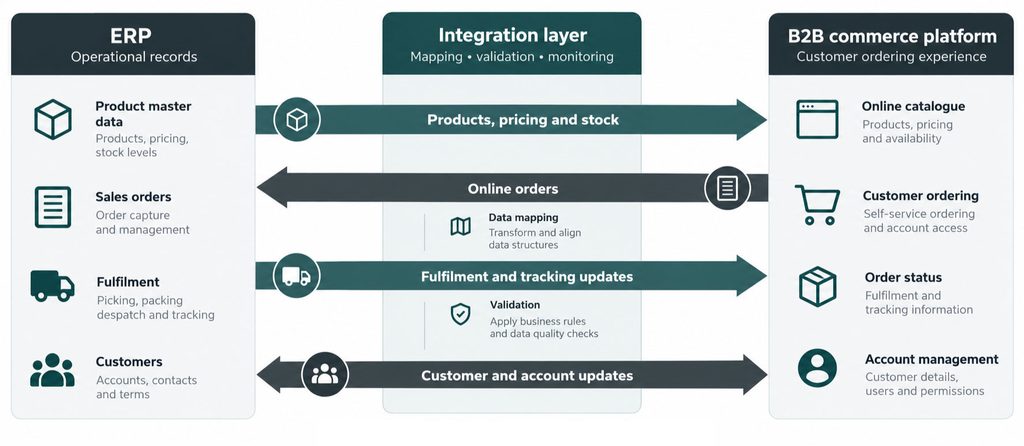
For wholesalers and distributors, the ERP is usually the system that controls the business.
It may own:
- Product master data.
- Customer records.
- Customer pricing.
- Stock availability.
- Warehouse data.
- Payment terms.
- Credit limits.
- Sales orders.
- Invoices.
- Credits.
- Returns.
- Fulfilment status.
- Financial reporting.
That means the eCommerce platform cannot be selected in isolation.
The platform must integrate properly with ERP systems such as:
- MYOB EXO
- MYOB Acumatica
- Pronto Xi
- SAP Business One
- SAP S/4HANA
- Microsoft Dynamics 365
- NetSuite
- Infor M3
- Apparel21
- Cin7
- Retail Express
The key integration question is:
Which platform can best expose ERP data to customers in a fast, reliable and maintainable way?
For example:
- Product data may come from the ERP or PIM.
- Stock availability may come from the ERP or warehouse system.
- Customer-specific pricing may need to be calculated or synchronised from the ERP.
- Orders may need to be validated before being accepted.
- Invoices and order history may need to be pulled from the ERP.
- Fulfilment updates may come from ERP, WMS or freight systems.
The best platform is the one that supports the right integration architecture for your business model.
Real-time vs scheduled integration
Not every B2B data flow needs to be real time.
Trying to make everything real time can add cost, complexity and performance risk.
Some data may need to be live, such as:
- Customer-specific pricing.
- Account status.
- Credit limit validation.
- Order submission.
- Critical stock availability.
Other data may be updated on a schedule, such as:
- Product catalogue data.
- Product attributes.
- Standard price lists.
- Customer account updates.
- Historical order data.
- Invoice data.
- Fulfilment updates.
In many B2B environments, the right answer is a hybrid integration model.
This may include:
- APIs.
- Middleware.
- Scheduled syncs.
- Webhooks.
- Queues.
- Retry logic.
- Exception logging.
- Monitoring through tools such as New Relic.
The platform selection should consider how well Shopify Plus or Adobe Commerce fits the integration model your business needs.
Source of truth matters
Before selecting a B2B platform, it is important to define the source of truth for each data object.
For example:
- ERP may own customers, pricing, stock, invoices and orders.
- eCommerce may own product merchandising, content, promotions and customer experience.
- PIM may own enriched product content and attributes.
- WMS may own fulfilment status.
- CRM may own sales activity and customer relationship data.
- Marketing platforms may own segmentation and campaign activity.
Without clear source-of-truth rules, data becomes duplicated and unreliable.
This is one of the biggest causes of failed B2B eCommerce projects.
When a custom B2B portal makes sense
Shopify Plus and Adobe Commerce are both strong platforms, but some businesses need a more custom portal experience.
A custom B2B portal may be suitable when the business needs:
- Highly specialised ordering workflows.
- Dealer portals.
- Franchise ordering.
- Sales rep assisted ordering.
- Procurement integration.
- PunchOut.
- Project-based ordering.
- Site-based ordering.
- Complex approval chains.
- Integration with proprietary systems.
- Non-standard product configuration.
- Account dashboards that go beyond eCommerce.
In these cases, the best solution may be a custom portal integrated with ERP, or a heavily customised Adobe Commerce environment.
The important point is to avoid forcing a standard platform to solve a highly specialised workflow if it is not the right fit.
Common B2B eCommerce platform mistakes
The most common mistake is choosing a platform based on brand preference rather than business fit.
Other mistakes include:
- Treating B2B like B2C with login.
- Underestimating ERP integration.
- Not defining customer-specific pricing properly.
- Failing to map account structures.
- Ignoring invoice and order history requirements.
- Trying to expose real-time data without considering performance.
- Not designing for failed syncs.
- Duplicating pricing logic across systems.
- Building a portal that customers find slower than email.
- Ignoring sales reps and customer service workflows.
- Selecting a platform before documenting business rules.
- Launching without proper monitoring and exception handling.
The right discovery process can prevent many of these issues before they become expensive.
Shopify Plus vs Adobe Commerce: which should you choose?
Choose Shopify Plus if your business wants a modern, scalable and easier-to-operate platform with strong B2B capability, faster speed to market and a clean customer experience.
It is especially suitable when:
- Your B2B model is relatively standardised.
- You want to reduce platform maintenance.
- You value speed and usability.
- You want strong B2C and B2B capability in one platform.
- Your ERP integration can handle complex operational logic outside the storefront.
- Your internal team wants a simpler admin experience.
Choose Adobe Commerce if your business has more complex B2B requirements and needs deeper control over catalogue, pricing, workflows and integrations.
It is especially suitable when:
- You have complex customer account structures.
- You need advanced customer-specific catalogues.
- You have detailed pricing and ordering workflows.
- You need custom checkout or approval processes.
- You operate multiple brands, regions or store views.
- Your ERP integration requires more custom control.
- Your product catalogue or customer model is complex.
The decision is not about which platform is better in general.
It is about which platform is better for your business model.
How OSE helps wholesalers and distributors choose the right B2B platform
OSE works with wholesalers, distributors and B2B suppliers that need more than a standard eCommerce website.
Our role is to help businesses understand the relationship between platform selection, ERP integration and customer experience.
That includes:
- B2B eCommerce discovery.
- Shopify Plus platform strategy.
- Adobe Commerce platform strategy.
- ERP integration planning.
- Customer account and pricing mapping.
- Product and stock integration.
- Order and fulfilment integration.
- B2B portal UX.
- Middleware and API architecture.
- Exception logging and monitoring.
- Ongoing support and optimisation.
The goal is not simply to launch a portal.
The goal is to build a B2B eCommerce platform that customers actually use and internal teams can trust.
Final thoughts
The best B2B eCommerce platform for wholesalers and distributors depends on operational complexity.
Shopify Plus is often the stronger choice for businesses that want speed, simplicity, scalability and a modern customer experience.
Adobe Commerce is often the stronger choice for businesses with complex B2B requirements, advanced account structures, customer-specific catalogues and deeper customisation needs.
For many businesses, the deciding factor will be niche technical areas that can have significant impact to overall business operations. If this sounds like you, we recommend reading our article ‘Adobe Commerce vs Shopify Plus for B2B eCommerce: Which Platform Is Right for Your Business?‘ which provides further insights.
If the platform cannot accurately support pricing, stock, customers, orders, invoices and fulfilment, the customer experience will suffer.
The best B2B eCommerce platform is the one that connects the customer experience to the operational reality of the business.
That is where the right strategy, platform and integration architecture make all the difference.