

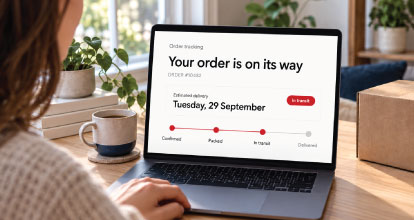
A customer completes a purchase, receives an order confirmation and starts looking forward to delivery. For the merchant, the work shifts to processing, fulfilment and dispatch. For the customer, a new set of questions begins.
Has my order been processed? Has it left the warehouse? When will it arrive?
How clearly a business answers these questions shapes the experience after checkout. Customers who can find reliable information have less reason to contact support and more confidence that their purchase is progressing.
Order tracking gives merchants an opportunity to maintain that confidence throughout delivery. An on-site tracking page can make the experience more convenient while bringing customers back to the store they purchased from.
Continue the experience after payment
Merchants invest considerable effort in helping customers discover products, understand their options and complete checkout.
The experience after payment deserves the same attention.
An order confirmation establishes that the purchase was received, but it cannot answer every question that follows. Customers may return hours or days later to check progress, particularly when buying something expensive, urgently needed or intended for a specific occasion.
Give them a clear route to that information from the beginning. Confirmation emails, customer accounts and the website’s navigation should make tracking easy to locate.
The aim is to provide a dependable place customers can visit whenever they need an update.
Explain the difference between order and delivery status
Order tracking involves several stages, and the distinction between them matters.
An order can be received but awaiting payment approval. It can be approved but waiting for stock. It can be packed with a shipping label attached while still awaiting collection.
Once the carrier receives the parcel, another sequence begins: transit, arrival at a local depot, delivery attempts and completion.
Customer-facing language should represent these stages accurately.
“Your order is being prepared” communicates something different from “Your parcel is on its way.” Creating a shipping label should not automatically produce a message suggesting that the carrier has collected the goods.
Clear status definitions help customers understand what has happened and what comes next. They also give support teams a consistent explanation when answering enquiries.
Create an order tracking page on your website
A dedicated on-site tracking page gives customers a familiar place to check their purchase.
The page can allow customers to enter their order number and a verification detail, such as the email address used at checkout, to retrieve an update. This supports guest shoppers as well as customers who have an account.
Once verified, the customer should see a concise overview of the order and any associated shipments. Useful information includes the current status, the latest update, an estimated delivery date where available and a clear next step if assistance is needed.
Place a visible “Track your order” link in the website’s footer, relevant support pages and order emails. Customers should be able to find it without searching through several menus.
The tracking page should feel like a natural part of the store, with the same branding, navigation and attention to usability.
Bring customers back to a familiar environment
An on-site tracking experience creates a practical reason for customers to return after purchasing.
Each visit gives the merchant another opportunity to provide useful information and demonstrate reliable service. Customers can check delivery progress while retaining easy access to product guidance, contact details and their account.
It also gives the business more control over how information is presented. Carrier terminology can be translated into clearer language, and updates from different delivery providers can follow a consistent format.
These return visits may lead customers to explore the store again, but that should be a secondary benefit. Someone checking a delayed parcel needs an answer before a promotion.
The strongest commercial value comes from making the website useful throughout the customer relationship.
Use APIs to connect the relevant systems
Building an on-site tracking page usually involves connecting information from several sources.
The commerce platform holds the order and customer records. The ERP or warehouse system may provide processing and dispatch updates. A carrier or shipping platform supplies parcel events and delivery estimates.
APIs can allow these systems to exchange information so the website presents an updated view of the order.
Depending on the available services, the integration might retrieve information when a customer checks their order, receive updates as events occur, or combine both approaches.
The technical design needs to account for how frequently each source updates, what information it provides and how reliably records can be matched.
The objective is a coherent customer experience built from accurate operational data.
Work with an agency that understands the full order journey
A capable eCommerce agency such as OSE can help merchants assess and develop an API-driven tracking experience around their existing systems.
The work begins with understanding where order and shipment information lives, which integrations are available and what customers need to see.
Development then involves more than placing an order-number field on a page. The solution needs to associate orders with shipments, interpret status updates, verify customer access and handle situations where information is delayed or unavailable.
A useful agency brief should include examples of ordinary orders alongside split shipments, backorders, failed deliveries and returns.
This gives the development team a clear picture of the experience the merchant needs to deliver. It also helps distinguish features supported by existing services from those requiring additional integration or custom development.
Protect customer information during lookup
Convenient tracking should include appropriate protection for order information.
An order number alone may be easy to guess, particularly when numbers follow a sequence. Pairing it with a verification detail or using a secure link can help ensure that customers access the correct record.
The verification method should reflect the sensitivity of the information displayed. More detailed order views may require stronger verification than a simple delivery-status summary.
Show only what is necessary for the tracking task. A public-facing lookup does not need to reveal full billing details or other information unrelated to delivery.
The implementation should also limit repeated lookup attempts and avoid error messages that disclose whether a particular customer or order exists.
These protections should be designed into the experience without making routine tracking unnecessarily difficult.
Make split shipments understandable
A single order does not always travel in one parcel.
Products may leave different warehouses, ship at different times or require specialist delivery. Some items may be available immediately while others remain on backorder.
An on-site tracking page can bring these details together.
Show which products belong to each shipment, the status of each parcel and any separate delivery estimates. If part of the order has arrived, make it clear which items are still outstanding.
Avoid marking the entire order as delivered when only one shipment is complete.
This is an area where a consolidated page can be particularly useful. Customers can understand the whole purchase without piecing together several emails and carrier links.
Be clear when information is delayed or unavailable
Tracking information is not always continuous.
A parcel may move between facilities without an immediate scan. A carrier service may be temporarily unavailable. An order may be ready for collection but have no delivery estimate yet.
The website should explain these situations without inventing progress.
Display the time of the latest update and distinguish between the last known status and newly retrieved information. If an external service is unavailable, preserve useful verified information and explain that further updates cannot currently be retrieved.
Where possible, provide a carrier reference or support route as a fallback.
Customers do not need technical details about an integration failure. They need to know what is confirmed, what remains uncertain and when they should seek help.
Make delivery exceptions actionable
A tracking page should help customers respond when something requires attention.
An unsuccessful delivery attempt may require redelivery arrangements. A parcel awaiting collection may have a deadline. An address issue may need the merchant or carrier to intervene.
Present the relevant action beside the status. Use clear links or instructions and identify who the customer should contact.
For delayed shipments, explain the support process and any appropriate waiting period without making customers search for a separate policy.
The page should also provide a straightforward route to report a parcel marked delivered but not received.
Useful tracking combines status information with practical guidance.
Connect tracking with timely notifications
An on-site page works best when customers know it exists.
Include a tracking link in order confirmations and dispatch emails. Send further notifications when a meaningful event occurs, such as a delivery exception or a shipment becoming available for collection.
Avoid sending repeated messages that provide no new information.
Email and SMS should direct customers to the same underlying order view so the message and website remain consistent. Where notification delivery fails, the on-site page still provides an independent way to check progress.
Keep promotional communication separate from essential updates. A customer should be able to understand the delivery message immediately.
Make every return visit useful
Once tracking information is clear, the page can offer relevant support for the product itself.
Assembly instructions, care guides, installation preparation and warranty information may help customers get ready for delivery. These additions are particularly useful for products that require planning before they arrive.
After delivery, the same page could provide access to returns assistance, product support or a convenient reorder option.
Recommendations and offers should remain restrained and appropriate to the order’s status. A delayed or disputed delivery is a poor moment to make additional sales the main focus.
A useful tracking page earns return visits by serving the customer’s immediate need.
Measure the quality of the tracking experience
Assess an on-site tracking page through customer and operational outcomes.
Monitor successful lookups, failed searches, information freshness and enquiries about order progress. Investigate repeated failures: customers may be entering a different reference number, using another email address or struggling with the form.
Compare support demand before and after launch while accounting for order volume and delivery disruptions.
Returning visits are also useful to understand, but they need context. Several visits may indicate convenient self-service or uncertainty about a stalled shipment.
Reliable order tracking gives customers somewhere to turn after checkout. By connecting systems, presenting clear updates and making assistance easy to access, merchants can keep their website useful long after the initial purchase.