
A successful B2B eCommerce platform rarely operates as a standalone system.
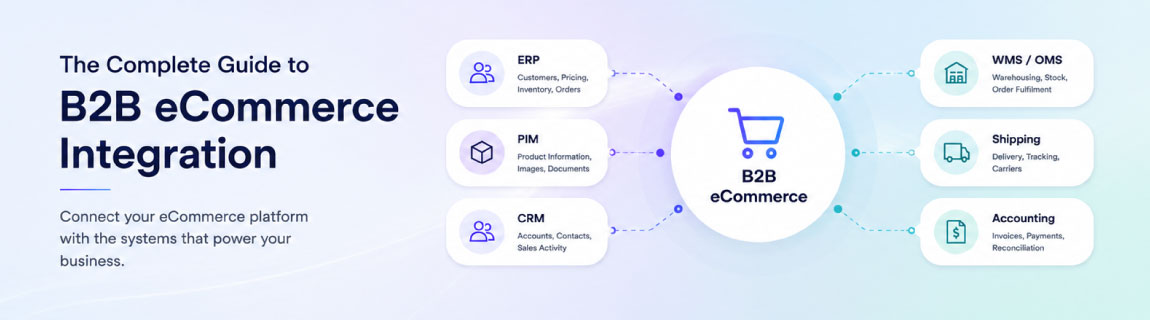
The online store may provide the customer-facing experience, but the information required to support that experience is usually spread across an ERP, CRM, warehouse platform, product information system, accounting application and other business systems.
Customers expect to see their correct pricing, available inventory, account terms, order history and delivery information as soon as they log in. Internal teams expect online orders to flow into existing operational systems without being manually re-entered.
B2B eCommerce integration is what brings these systems together.
However, integration involves more than connecting one API to another. Businesses must decide which system owns each type of data, how information should move, how quickly it should update and what should happen when one of the connected systems is unavailable.
This guide explains the systems, data flows, architecture decisions and planning considerations involved in building a reliable B2B eCommerce integration.
Understanding the B2B eCommerce Integration Landscape
A B2B eCommerce platform sits within a broader technology environment.
These operational systems can support either a shared storefront or a dedicated trade experience. Our guide to B2B ordering on an existing website versus a separate portal explains how to assess that customer-facing decision.
Depending on the business, that environment may include:
- An enterprise resource planning system
- A customer relationship management platform
- A product information management system
- A warehouse management system
- An order management system
- Accounting and finance software
- Shipping and freight platforms
- Marketing automation software
- Procurement platforms
- Business intelligence and reporting tools
Each system has a different role.
The ERP may manage customers, pricing, inventory, purchasing and finance. The eCommerce platform may manage product discovery, customer login, account ordering and checkout. A PIM may hold enriched product descriptions, specifications and technical documents, while a CRM may store sales activity and customer relationships.
The purpose of integration is not to duplicate every function across every platform. It is to create a coordinated environment in which each system performs its intended role while the necessary information moves reliably between them.
Why B2B eCommerce Integration Matters
Many B2B eCommerce problems are not caused by the eCommerce platform itself. They result from gaps between the platform and the systems supporting it.
Without effective integration, businesses can experience:
- Incorrect customer pricing
- Outdated stock availability
- Orders requiring manual entry
- Duplicate customer records
- Delayed fulfilment
- Inconsistent product information
- Missing invoice and shipment data
- Limited visibility for customers and internal teams
These issues create operational costs and undermine trust in the digital channel.
A well-integrated B2B platform provides customers with a self-service experience while maintaining the business rules already managed within the organisation.
It can also reduce repetitive administration by automating the movement of orders, customer records, inventory, pricing and fulfilment information.
The Business Systems That Power B2B Commerce
The exact integration landscape will vary between businesses, but several systems commonly form part of a B2B eCommerce environment.
Enterprise Resource Planning
The ERP is often the operational centre of a B2B organisation.
It may manage:
- Customer accounts
- Product records
- Contract pricing
- Inventory
- Warehouses
- Purchasing
- Sales orders
- Invoices
- Credit limits
- Payment terms
- Financial reporting
Common ERP platforms used by B2B businesses include Microsoft Dynamics 365, SAP, NetSuite, MYOB, Pronto, Cin7, Infor and Odoo.
The ERP is frequently the source of truth for commercial and operational data, although it should not automatically be assumed to own every field used by the eCommerce platform.
Customer Relationship Management
A CRM manages customer relationships, sales activity, contacts, opportunities and account history.
Integrating the CRM with eCommerce can give sales teams greater visibility into digital behaviour, including:
- Customer registrations
- Orders
- Quote requests
- Product interest
- Abandoned sessions
- Account activity
- Repeat purchase behaviour
The integration can also allow approved customer and contact information to flow into the eCommerce platform.
Product Information Management
A PIM is useful when product data is too complex or extensive to be managed effectively within the ERP or eCommerce platform alone.
It can hold:
- Product descriptions
- Technical specifications
- Images
- Videos
- Documents
- Compatibility information
- Product relationships
- Channel-specific content
- Category structures
The ERP may continue to own operational product fields such as SKU, cost and stock, while the PIM manages enriched content used across digital channels.
Warehouse and Order Management Systems
A WMS manages warehouse activities such as picking, packing, stock movements and dispatch.
An OMS may coordinate orders across multiple sales channels, warehouses, stores or fulfilment partners.
These platforms become particularly important when the business operates:
- Multiple warehouses
- Split fulfilment
- Store-based fulfilment
- Drop shipping
- Backorders
- International distribution
- Complex allocation rules
Marketing Automation
Platforms such as Klaviyo can use eCommerce activity to support customer communications, segmentation and lifecycle marketing.
Relevant data may include:
- Customer profiles
- Order history
- Product interest
- Account type
- Purchase frequency
- Category preferences
- Customer value
- Marketing consent
For B2B organisations, marketing automation can also support replenishment reminders, dormant account campaigns, new product communications and customer-specific segmentation.
The Data That Needs to Flow Between Systems
Before selecting an integration method, the business must understand exactly what information needs to move between its systems.
Product Data
Product data may include:
- SKUs
- Product names
- Categories
- Units of measure
- Variants
- Pack sizes
- Technical specifications
- Images
- Documents
- Product relationships
- Discontinued status
Product information may originate in an ERP, PIM or supplier system.
Customer and Account Data
B2B customer structures are often more complex than standard consumer accounts.
The integration may need to support:
- Parent and child accounts
- Multiple contacts
- Multiple delivery addresses
- Account roles
- Purchasing permissions
- Sales representatives
- Account status
- Customer groups
- Tax exemptions
When it comes to customer and account-specific data, it’s important to define whether customers can register online, whether accounts require approval, and which system ultimately creates the official customer record.
Customer-Specific Pricing
Pricing is one of the most important and difficult parts of many B2B integrations.
A business may use:
- Contract pricing
- Customer-specific pricing
- Customer group pricing
- Quantity breaks
- Promotional pricing
- Tiered pricing
- Branch pricing
- Location-specific pricing
- Currency-based pricing
The integration must determine whether prices are transferred to the eCommerce platform in advance or calculated by the ERP when a customer requests them.
Inventory and Availability
Inventory information may need to account for more than a single stock quantity.
Customers may need to see:
- Available stock
- Stock by warehouse
- Stock by branch
- Incoming stock
- Expected availability
- Backorder status
- Allocated stock
- Safety stock
- Lead times
The displayed availability may also need to differ from the actual quantity held in the ERP.
Orders
Once an online order is placed, the integration may need to send:
- Customer account
- Contact details
- Delivery address
- Billing address
- Products
- Quantities
- Pricing
- Discounts
- Taxes
- Freight
- Payment method
- Purchase order number
- Delivery instructions
- Cost centre
- Approval information
The ERP or OMS may then return an order number and status.
Invoices, Shipments and Tracking
B2B customers often expect to use the portal after checkout as well as before it.
The platform may need to display:
- Order status
- Fulfilment status
- Shipment information
- Tracking numbers
- Invoices
- Credit notes
- Outstanding balances
- Previous orders
This allows the portal to become a true account management tool rather than simply an ordering interface.
Choosing the Right Integration Architecture
One of the most important decisions is how the eCommerce platform will connect to the rest of the business environment.
The main options are direct API integration, middleware-based integration and a hybrid approach.
The right choice depends on the number of systems involved, the complexity of the data, expected transaction volumes, business risk and future growth plans.
Direct API Integration
A direct integration connects the eCommerce platform straight to another system, such as an ERP.
For example, the eCommerce platform may call an ERP API to retrieve pricing or send an order immediately after checkout.
When Direct Integration Makes Sense
A direct API integration can be suitable when:
- Only two systems need to communicate
- The workflows are relatively simple
- The source system has a reliable modern API
- Transaction volumes are manageable
- Limited data transformation is required
- There are few dependencies on other platforms
- The integration is unlikely to expand significantly
Direct integrations can be quicker to implement and may involve less initial infrastructure.
They can work well for clearly defined workflows where the eCommerce platform and ERP are expected to remain closely connected.
Limitations of Direct Integration
Direct integration can become difficult to manage as the technology environment grows.
If the eCommerce platform connects independently to the ERP, CRM, PIM, WMS, freight provider and marketplace platforms, the business creates a network of point-to-point connections.
Each system must understand the data structures and availability of the others.
This can lead to:
- Business logic being duplicated across integrations
- Strong dependencies between systems
- Limited visibility when transactions fail
- More difficult system replacements
- Increased maintenance effort
- Poor handling of temporary outages
- Performance issues during traffic or order spikes
A direct connection can also expose the customer experience to the performance of the ERP. If the eCommerce platform requires a live ERP response to display every price or stock value, slow ERP performance can directly affect page speed and checkout reliability.
Infrastructure-Driven Middleware
Middleware creates an integration layer between the eCommerce platform and connected business systems.
Instead of every system communicating directly with every other system, the middleware receives, transforms, stores, routes and monitors data.
This integration layer may be built using cloud infrastructure and services such as:
- APIs
- Message queues
- Databases
- Scheduled processes
- Event-driven functions
- Data transformation services
- Monitoring and alerting tools
- Secure storage
- Retry and reconciliation processes
It may also be delivered through an iPaaS product or enterprise integration platform.
Why Middleware May Be Required
Middleware becomes valuable when the integration must do more than transfer a simple payload between two systems.
It can provide:
Decoupling
The eCommerce platform does not need to depend directly on the structure or availability of the ERP.
The middleware can accept an order immediately, queue it and deliver it to the ERP when the receiving system is available.
Data Transformation
Different systems often represent the same information in different ways.
Middleware can translate:
- Product identifiers
- Customer codes
- Units of measure
- Address formats
- Tax codes
- Order statuses
- Warehouse identifiers
- Pricing structures
This allows each connected platform to continue using its preferred data model.
Queueing and Retry Management
When an ERP or another system is temporarily unavailable, transactions can be queued rather than lost.
The integration layer can retry failed transactions according to defined rules and alert the support team when manual intervention is required.
Centralised Business Logic
Rules that apply across multiple channels can be managed centrally.
For example, the middleware may determine:
- Which warehouse should receive an order
- How customer pricing should be transformed
- Which products should be published
- How account structures should be mapped
- Which fulfilment method should be used
- How orders should be routed between systems
Monitoring and Visibility
A strong middleware solution provides a clear view of integration activity.
Support teams should be able to identify:
- Successful transactions
- Failed transactions
- Pending transactions
- Retry attempts
- Invalid data
- Slow processes
- System outages
This is particularly important for order and payment workflows where failures can have immediate commercial consequences.
Scalability
Cloud-based middleware can be designed to handle peaks in demand without sending every transaction directly to the ERP at the same moment.
This is useful during promotions, seasonal peaks, bulk ordering periods and high-volume catalogue updates.
Easier Expansion
Once the integration layer is established, additional channels can connect to it without rebuilding every existing integration.
A business may later add:
- A second eCommerce store
- A marketplace
- A mobile application
- A dealer portal
- A supplier portal
- A new warehouse
- A new ERP
- International operations
The middleware becomes a reusable integration capability rather than a connection built for a single project.
Direct Integration, Middleware or a Hybrid Approach?
The choice does not always need to be one or the other.
Many organisations use a hybrid model.
For example:
- Customer pricing may be retrieved from the ERP in real time
- Product content may be synchronised from a PIM on a schedule
- Orders may be placed into a middleware queue
- Inventory may update every few minutes
- Shipment events may be delivered through webhooks
- Marketing data may flow directly from the eCommerce platform to Klaviyo
The architecture should reflect the requirements of each data flow rather than applying the same integration pattern to everything.
A useful principle is to avoid real-time dependencies unless the business benefit justifies them.
Real-Time Versus Scheduled Synchronisation
Not every type of data needs to update immediately.
Real-time integration is useful when delays would materially affect the customer or business.
Examples may include:
- Customer authentication
- Credit validation
- Live pricing
- Order submission
- Payment confirmation
- Stock reservation
- Quote approval
Scheduled or near-real-time synchronisation may be more appropriate for:
- Product descriptions
- Images
- Category assignments
- Historical invoices
- Customer segmentation
- Reporting data
- Large catalogue updates
Real-time integration can create a better experience, but it also introduces greater system dependency.
If the eCommerce platform cannot complete a task without receiving an immediate response from the ERP, an ERP outage can become an eCommerce outage.
The architecture should balance freshness, speed, resilience and operational complexity.
Integrating Customer-Specific Pricing and Catalogues
B2B eCommerce commonly requires each customer to see a different commercial experience.
This may include:
- Negotiated prices
- Restricted products
- Approved brands
- Customer-specific catalogues
- Minimum quantities
- Pack sizes
- Tiered discounts
- Contract terms
- Regional availability
The first step is to determine where these rules are currently managed.
If pricing is calculated within the ERP, the business must decide whether to:
- Replicate prices into the eCommerce platform
- Request prices from the ERP in real time
- Pre-calculate pricing through middleware
- Use a combination of these methods
For businesses with a large number of customers and products, transferring every possible customer-product price combination may be impractical.
In these cases, pricing may need to be calculated dynamically or organised using pricing groups and rule structures.
Inventory, Warehousing and Fulfilment Integration
Inventory integration should reflect how the business actually fulfils orders.
A single stock quantity may not be sufficient when a business operates multiple warehouses or branches.
The integration may need to determine:
- Which inventory locations are relevant to each customer
- Whether stock should be reserved during checkout
- How safety stock is applied
- Whether backorders are permitted
- Which warehouse receives the order
- Whether orders can be split
- How incoming stock is represented
- Whether customers should see exact quantities
The eCommerce platform should not necessarily display the raw inventory quantity from the ERP.
A business may choose to show availability statuses such as:
- In stock
- Limited stock
- Available in 3 to 5 days
- Backorder available
- Contact us
This can protect sensitive inventory information while still giving customers useful purchasing guidance.
Order Management and Post-Purchase Visibility
The order integration is one of the most commercially critical parts of the project.
The process should account for what happens when:
- The ERP accepts the order
- The ERP rejects the order
- A product code is invalid
- Pricing has changed
- Credit is unavailable
- Stock is no longer available
- The customer uses an invalid purchase order number
- The ERP is offline
- An order is submitted twice
The integration should use unique transaction identifiers and idempotency controls to reduce the risk of duplicate orders.
Customers should also receive clear order status information.
Where possible, the portal should allow customers to view:
- Submitted orders
- ERP order numbers
- Order status
- Shipment status
- Tracking details
- Invoices
- Previous purchases
- Reorder options
PunchOut and Procurement Integration
Larger B2B customers may prefer to purchase through their own procurement systems rather than logging directly into a supplier portal.
PunchOut integration allows a buyer to access the supplier’s catalogue from a procurement platform, build a cart and return the order information to their internal purchasing workflow.
Common standards include cXML and OCI.
PunchOut projects may involve:
- Procurement system authentication
- Customer-specific catalogues
- Contract pricing
- Cart transfer
- Purchase order submission
- Approval workflows
- Order confirmation
- Invoice integration
PunchOut requirements should be identified early because they can affect customer authentication, pricing, catalogue structure and checkout design.
Security and Access Control
B2B integrations handle commercially sensitive information.
This can include customer pricing, account balances, credit terms, order history and product availability.
Security considerations should include:
- Secure authentication
- API access controls
- Encryption in transit and at rest
- Role-based permissions
- Secret and credential management
- Audit logging
- Rate limiting
- IP restrictions where appropriate
- Personal information handling
- Vulnerability management
The eCommerce platform should also enforce appropriate account permissions.
A customer account may include buyers, managers and administrators with different abilities to place orders, approve purchases, manage users or access financial information.
Monitoring, Logging and Error Recovery
An integration is not complete simply because it works during testing.
It must also be supportable in production.
Every important transaction should produce enough information to determine:
- What happened
- When it happened
- Which systems were involved
- Whether the transaction succeeded
- Why it failed
- Whether it was retried
- Whether manual intervention is needed
Monitoring tools can be used to track system health, application errors and integration failures.
Alerts should be prioritised according to business impact. A failed product image update does not require the same response as a failed paid order.
The project should also define ownership.
Someone must be responsible for investigating failures across the eCommerce platform, middleware, ERP and other connected systems.
Common B2B Integration Challenges
Poor Source Data
Integration often exposes issues that already exist in the ERP or product data.
These may include duplicate customer accounts, inconsistent product codes, missing addresses and outdated pricing rules.
Data cleansing should be treated as part of the project rather than discovered immediately before launch.
Unclear System Ownership
If two systems can independently update the same field, conflicts are likely.
Every important data type should have a clearly defined source of truth.
Legacy System Constraints
Older ERP and warehouse platforms may have limited APIs, restricted processing capacity or inflexible data structures.
Middleware can help protect the eCommerce platform from these constraints, but it cannot remove the need to understand them.
Excessive Real-Time Dependencies
Real-time integration may appear preferable, but it can create performance and reliability risks.
Each live dependency should have a clear business justification and a fallback process.
Business Logic Hidden in Manual Processes
Many B2B rules are understood by experienced staff but are not documented.
Examples include special pricing decisions, freight exceptions, warehouse selection and account approval rules.
These processes must be identified before they can be automated.
Inadequate Failure Handling
Happy-path testing is not enough.
The integration must account for invalid data, duplicate transactions, system outages, timeouts and partial failures.
How to Plan a B2B eCommerce Integration Project
A successful project usually begins with discovery and data mapping rather than development.
1. Identify the Systems
Document every platform that may exchange information with the eCommerce solution.
2. Define the Source of Truth
Determine which system owns each data type.
3. Map the Data Flows
Document what moves between systems, in which direction and how often.
4. Document the Business Rules
Capture pricing, customer, inventory, order, freight and fulfilment rules.
5. Assess the Available APIs
Review authentication, endpoints, limits, documentation, performance and error responses.
6. Select the Architecture
Decide where direct integration is appropriate and where middleware is needed.
7. Design Error Handling
Define queueing, retries, alerts, reconciliation and manual recovery processes.
8. Plan Security
Confirm access controls, credentials, encryption and audit requirements.
9. Establish Testing Scenarios
Include standard, edge-case and failure scenarios.
10. Define Production Support
Determine who monitors the integration and how incidents will be resolved.
Testing a B2B eCommerce Integration
Testing should cover more than whether data appears in the expected system.
Important test scenarios include:
- New customer creation
- Existing customer updates
- Customer-specific pricing
- Product restrictions
- Quantity breaks
- Multiple delivery addresses
- Credit limits
- Payment terms
- Tax calculations
- Freight calculations
- Inventory changes
- Backorders
- Partial fulfilment
- Cancelled orders
- Duplicate submissions
- ERP downtime
- Invalid data
- High transaction volumes
- Failed retries
- Invoice and shipment updates
Business users should participate in acceptance testing because they understand the operational exceptions that may not be obvious to the delivery team.
Choosing a B2B eCommerce Integration Partner
B2B integration requires knowledge beyond the eCommerce platform.
An integration partner should be able to understand:
- The eCommerce experience
- ERP structures
- B2B account models
- Customer-specific pricing
- Data architecture
- Middleware
- Cloud infrastructure
- Security
- Monitoring
- Operational support
The partner should also be willing to challenge assumptions.
A requested direct integration may not be appropriate if it creates a critical dependency on an ageing ERP. A middleware platform may not be justified if only one straightforward data flow is required.
The architecture should reflect the needs of the business rather than the preferred technology of the implementation partner.
Future-Proofing the Integration Strategy
A B2B eCommerce integration should support the current project without restricting future growth.
Businesses should consider whether they may later add:
- New sales channels
- Additional warehouses
- New brands
- International stores
- Marketplaces
- Mobile applications
- Supplier integrations
- Procurement integrations
- A replacement ERP
- New customer portals
Future-proofing does not mean building every possible capability from the beginning.
It means avoiding unnecessary dependencies, centralising reusable business logic where appropriate and creating clear interfaces between systems.
B2B eCommerce Integration Checklist
Before beginning an integration project, confirm:
- Which systems need to connect
- Which system owns each data type
- What data needs to move
- How frequently each data flow must run
- Which processes require real-time responses
- Whether direct API integration is appropriate
- Whether middleware is required
- How data will be transformed
- How failed transactions will be retried
- How integration activity will be monitored
- How duplicate transactions will be prevented
- How customer-specific pricing will work
- How inventory availability will be calculated
- How orders will enter the ERP or OMS
- How invoices and shipments will return to the portal
- How users and permissions will be managed
- How security credentials will be protected
- How the integration will be tested
- Who will support the integration after launch
- How future systems and channels could be added
Building a Reliable B2B Commerce Environment
B2B eCommerce integration is not simply a technical connection between a website and an ERP.
It is the architecture that allows customers, digital channels and operational systems to work together.
The strongest solutions begin with clear ownership of data and business rules. They use direct APIs where simplicity and immediacy provide value, while introducing middleware where resilience, transformation, monitoring and scalability are required.
By designing the integration around business operations, customer expectations and long-term support requirements, organisations can create a B2B eCommerce platform that improves efficiency today and provides a foundation for future growth.