


Choosing an eCommerce platform becomes more complicated when a retailer operates multiple stores, brands, regions or fulfilment locations.
Both Shopify Plus and Adobe Commerce support large multi-store retail operations. However, the two platforms approach multi-store commerce very differently.
Shopify Plus generally prioritises operational simplicity, rapid deployment and a managed SaaS environment. Adobe Commerce provides a more configurable hierarchy for businesses that need different websites, catalogues, pricing structures and customer experiences managed within one commerce implementation.
The right choice therefore depends on what “multi-store” means for your business.
A retailer with one brand and 80 physical locations has very different requirements from a retail group operating five separate brands, each with its own products, pricing, content and customer database.
Understanding that distinction is the first step towards selecting the right platform.
Quick Overview
For many single-brand retailers with a large physical store network, Shopify Plus will provide the simpler and more cost-effective operating model. Shopify can manage inventory across multiple locations, support Shopify POS, route orders between fulfilment locations and offer in-store pickup from one commerce environment.
For retail groups operating multiple distinct brands or highly differentiated storefronts, Adobe Commerce will often provide the more flexible architecture. A single Adobe Commerce installation can contain multiple websites, stores and store views, with different domains, catalogues, navigation structures, branding and content managed through a shared administration environment.
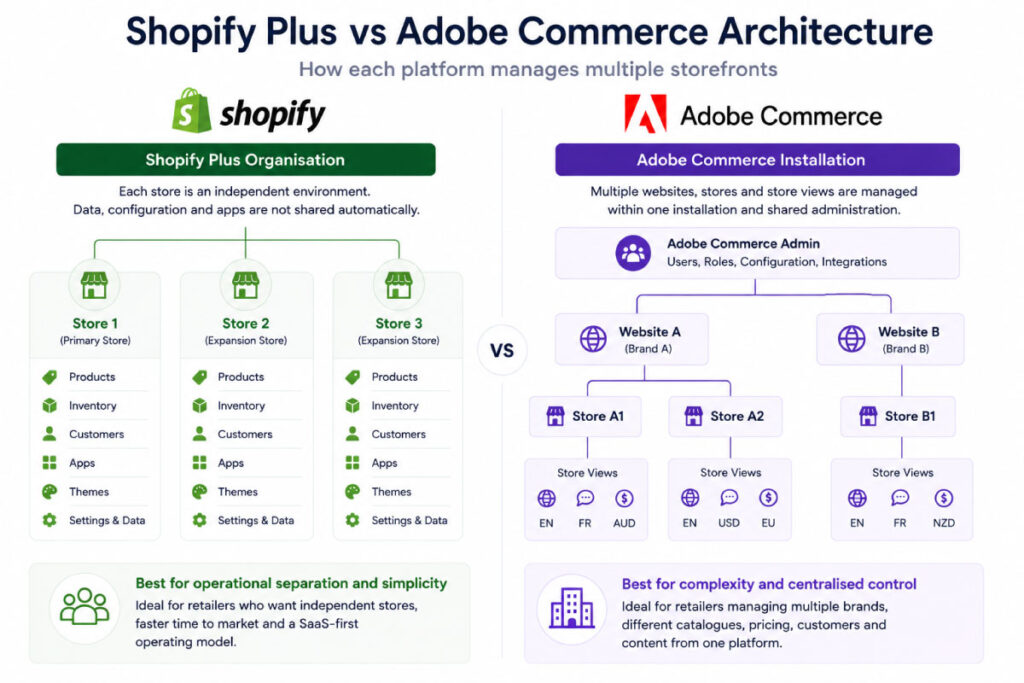
Shopify Plus can also operate multiple storefronts through expansion stores. However, each expansion store remains operationally independent. Products, collections, inventory, configuration and other store data are not automatically synchronised between stores.
The broad distinction is:
- Shopify Plus: Best suited to retailers prioritising ease of operation, faster delivery and a more standardised commerce model.
- Adobe Commerce: Best suited to retailers requiring deeper control across multiple brands, catalogues, storefronts and business rules.
There are important exceptions, which we explore below.
What Does Multi-Store eCommerce Actually Mean?
Before comparing platforms, it is important to define the type of multi-store operation being built.
Multi-store eCommerce can describe several different business models.
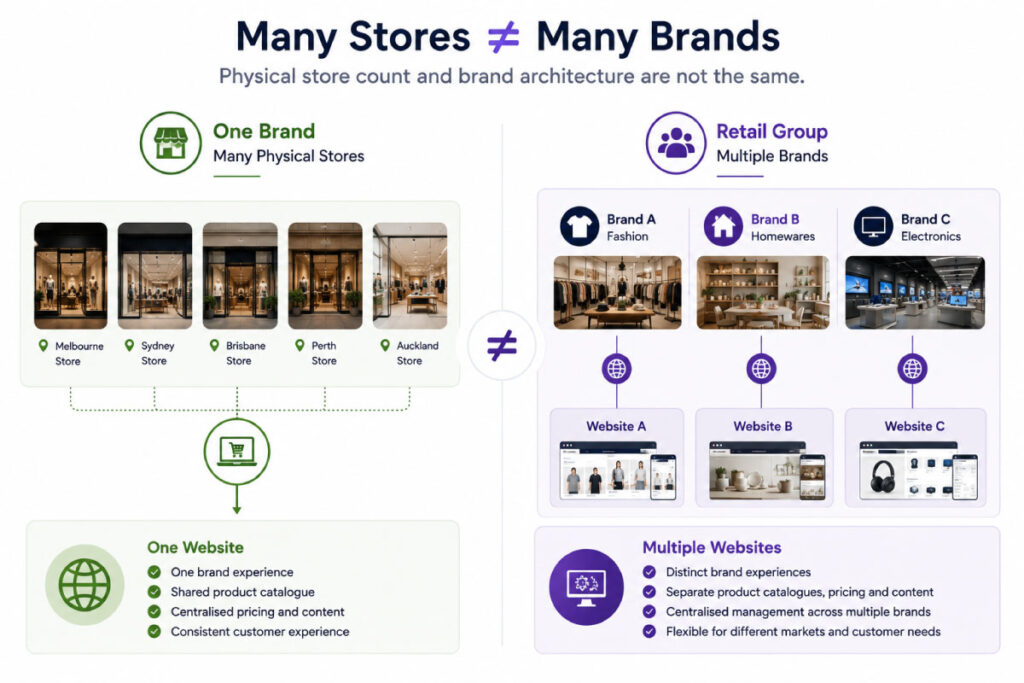
Multiple physical retail locations
A retailer may operate one online brand with inventory distributed across many physical stores, warehouses or distribution centres.
The key requirements are usually:
- Store-level inventory visibility
- Click and collect
- Ship-from-store
- Inventory transfers
- Location-based order routing
- Store-specific opening hours and information
- POS integration
- ERP or inventory management integration
This does not necessarily require multiple eCommerce websites.
Multiple international or regional storefronts
A retailer may operate the same brand in Australia, New Zealand, the United States and Europe.
These storefronts may require different:
- Currencies
- Languages
- Domains
- Product ranges
- Prices
- Promotions
- Tax treatment
- Shipping methods
- Legal entities
Depending on the level of variation, these markets may be managed within one storefront or across several separate storefronts.
For Australian retailers planning a New Zealand launch, our guide to extending an existing store versus building a separate New Zealand site explains how regional operating requirements should shape this decision.
Multiple brands
A retail group may own several brands that operate independently.
Each brand might require its own:
- Domain
- Design system
- Product catalogue
- Customer database
- Marketing technology
- Pricing strategy
- Content
- Promotions
- Operational team
This is a fundamentally different requirement from managing multiple physical stores under one brand.
Franchise or dealer networks
Some businesses need to provide individual experiences for franchisees, dealers or store territories.
Requirements may include:
- Store-specific product availability
- Localised promotions
- Location-specific fulfilment
- Regional pricing
- Individual store pages
- Dealer-specific content
- Central brand governance
The platform decision should be based on which of these models most closely reflects your business.
The Fundamental Architectural Difference
The biggest difference between Shopify Plus and Adobe Commerce is how each platform structures multiple storefronts.
How Shopify Plus Manages Multiple Stores
A Shopify retailer can often operate one Shopify store and configure multiple physical locations within it.
Each location can represent a:
- Retail store
- Warehouse
- Pop-up location
- Third-party logistics provider
- Fulfilment service
Shopify tracks inventory separately at each location and can route orders based on inventory availability, location priority and proximity to the customer. Shopify POS can also be assigned to retail locations within the same store.
For regional selling, Shopify Markets can customise elements such as products, pricing, currencies, languages, domains, theme content, taxes and duties for different customer markets. This means a separate Shopify store is no longer automatically required for every country or region.
Where a genuinely separate storefront is needed, Shopify Plus supports expansion stores.
Expansion stores are separate Shopify stores belonging to the same Shopify Plus organisation and contract. Shopify currently includes one main store and up to nine expansion stores under a standard Plus contract, subject to eligibility requirements.
However, the stores remain separate environments.
Shopify states that products, collections, inventory, settings and configurations are not automatically shared between expansion stores. Applications and production theme licences can also be charged separately for each store.
This makes Shopify’s model easy to understand, but it can create duplicated administration and integration requirements when many independent storefronts are involved.
How Adobe Commerce Manages Multiple Stores
Adobe Commerce uses a hierarchy consisting of:
- Websites
- Stores
- Store views
A single Adobe Commerce installation can support multiple websites with different domains. Each website can contain multiple stores, and each store can contain multiple store views.
This structure allows a retailer to share or separate different elements of the commerce environment which can be highly economical in terms of maintenance.
For example, different websites can have separate:
- Domains
- Customers
- Pricing
- Checkout configurations
- Product availability
- Currencies
Stores can use different root categories, allowing each store to have its own navigation and catalogue structure. Store views are commonly used for different languages or localised content.
All of these storefronts can share the same underlying Adobe Commerce codebase and administration environment.
This can make Adobe Commerce particularly effective for retail groups that need to operate multiple differentiated brands while retaining central control over technology, catalogue information and integrations.
The trade-off is greater architectural and administrative complexity.
Shopify Plus vs Adobe Commerce: At a Glance
| Requirement | Shopify Plus | Adobe Commerce |
|---|---|---|
| One brand with many physical locations | Strong fit | Strong fit |
| Multiple regions using the same operating model | Strong fit through Shopify Markets | Strong fit through websites and store views |
| Multiple distinct retail brands | Possible, but commonly requires separate stores and additional synchronisation | Strong native multi-website architecture |
| Shared administration | Organisation-level users and billing, but separate store data | Shared Admin and codebase across websites and stores |
| Different catalogues by market | Supported through Markets and catalogues | Highly configurable by website and store |
| Different storefront designs | Market-specific customisation or separate expansion stores | Separate themes, branding and content by store |
| Store-level inventory | Native Shopify locations | Native Adobe Commerce inventory sources |
| Native retail POS | Shopify POS | Usually integrated with a separate POS |
| Platform infrastructure | Managed SaaS | Established PaaS model and newer SaaS offering |
| Code-level customisation | Controlled extension model | Extensive control in the PaaS model |
| Ongoing technical overhead | Generally lower | Generally higher |
| Complex multi-brand consolidation | Can become fragmented across stores | One of Adobe Commerce’s strongest use cases |
1. Managing Multiple Physical Retail Locations
For a retailer with one primary brand and many physical locations, Shopify Plus is often the simpler option.
Shopify locations allow inventory to be tracked independently across retail stores, warehouses and other fulfilment locations. Orders can be automatically allocated using order-routing rules based on factors such as inventory availability and proximity.
Shopify also provides native support for:
- Shopify POS
- In-store pickup
- Inventory transfers
- Store-level fulfilment
- Pickup availability
- Shipping and pickup within the same order
Shopify’s in-store pickup functionality can transfer inventory from another location when the selected pickup store does not have sufficient stock. It can also prioritise available inventory from nearby locations.
Adobe Commerce also provides comprehensive multi-source inventory functionality.
Physical stores, warehouses, distribution centres and drop shippers can be configured as inventory sources. Adobe Commerce can aggregate salable inventory across sources and recommend fulfilment locations based on source priority or distance.
Adobe Commerce also supports in-store pickup, allowing customers to select an eligible inventory source as their pickup location during checkout.
The main difference is that Shopify provides a more integrated combination of eCommerce, inventory locations and POS.
Adobe Commerce retailers commonly use a dedicated ERP, POS or order management system as the primary source of inventory and fulfilment logic. Adobe Commerce then integrates with those systems to present inventory availability and capture customer orders.
Verdict
For a relatively standard single-brand retail network, Shopify Plus usually has the advantage.
For a retailer with highly customised fulfilment logic or an established enterprise ERP, POS and OMS ecosystem, Adobe Commerce provides greater flexibility.
2. Managing Multiple Brands
Multi-brand retail is where the differences between the platforms become more pronounced.
Adobe Commerce allows multiple websites and stores to operate within one implementation. These websites can have different domains, designs, catalogues and content while sharing selected services and technical infrastructure.
This can be particularly valuable when a group wants to:
- Manage multiple brands from one Admin
- Reuse common functionality
- Share selected products or attributes
- Maintain different category structures
- Integrate every brand with the same ERP
- Apply group-wide development standards
- Deploy improvements across several storefronts
Shopify Plus can also support multiple brands, but different brands will generally require separate stores.
Standard Shopify Plus expansion stores are intended to be extensions of the primary brand and must meet Shopify’s eligibility requirements. Shopify advises that businesses requiring unrelated brands may need a separate multi-brand agreement, with each brand operating on its own Shopify Plus subscription.
Each Shopify store also maintains its own product, inventory, application and configuration data unless an ERP, PIM, middleware platform or application is introduced to synchronise it.
This does not make Shopify unsuitable for multi-brand groups. In some cases, isolation between brands is desirable.
Separate Shopify stores can give each brand:
- Independent release schedules
- Separate applications
- Independent merchandising teams
- Isolated customer and order data
- Reduced risk of one brand affecting another
However, the group may lose some of the efficiency expected from operating one shared commerce platform.
Verdict
Adobe Commerce generally has the advantage for a retail group seeking to consolidate several differentiated brands into one commerce implementation.
Shopify Plus can be the better choice when each brand is intended to operate as an independent business with limited shared functionality.
3. International and Regional Commerce
Shopify Markets has significantly expanded what retailers can manage from one Shopify store.
Markets can be used to customise:
- Product availability
- Pricing
- Currencies
- Languages
- Domains
- Theme content
- Taxes and duties
- Business entities
These customisations inherit from the primary store configuration until a market-specific override is created.
This reduces the need to create separate Shopify expansion stores for every international market.
A retailer offering largely the same brand, catalogue and customer experience across Australia and New Zealand may be able to manage both markets through one Shopify store.
An expansion store may still be appropriate where a region requires substantially different:
- Operational teams
- Applications
- Checkout configurations
- Product data
- Integrations
- Release schedules
- Business processes
Adobe Commerce provides a more structural approach to regionalisation.
Different countries can be configured as websites, stores or store views depending on how much needs to differ. Prices can be scoped globally or by website, while store views can be used for languages and localised content.
This gives Adobe Commerce considerable flexibility, but the store hierarchy must be designed carefully. A poorly planned hierarchy can make catalogue management, integrations, indexing and administration unnecessarily difficult.
Verdict
Shopify Plus is usually the stronger option when international markets share a largely standardised operating model.
Adobe Commerce becomes more attractive when each region requires deeply different catalogues, business rules, checkout experiences or system integrations.
4. Product Catalogue and Pricing Complexity
Both platforms can offer different products and prices to different customer markets.
Shopify Markets uses catalogues to determine which products are available in a market and what prices those customers see. Theme and content variations can also be applied to specific markets.
This is suitable for many retailers that need to:
- Exclude certain products from particular countries
- Apply market-specific pricing
- Present local currencies
- Change regional promotions
- Adapt storefront content
The complexity increases when a retailer operates multiple independent Shopify stores. Because product and collection data is not continuously shared between expansion stores, an external PIM, ERP or synchronisation solution may be required.
Adobe Commerce provides extensive catalogue scoping.
Stores can share a catalogue or use separate root categories. Product prices can be global or scoped by website, allowing the same product to have different base pricing across different websites.
This makes Adobe Commerce well suited to scenarios involving:
- Different assortments by brand
- Shared products across several brands
- Region-specific product attributes
- Different navigation structures
- Complex promotional rules
- Large product catalogues
- Product information inherited and overridden at different levels
That flexibility must still be governed carefully. Without clear ownership and data rules, a highly configurable catalogue can become difficult for merchandising teams to manage. However, regardless of platform, if your product data needs work, the platform will not be able to function at its full-potential.
Verdict
Shopify Plus handles standard regional catalogue and price variation effectively.
Adobe Commerce has the advantage when catalogue relationships, pricing rules and storefront structures are highly complex.
5. Inventory, Fulfilment and Click and Collect
Both platforms can manage inventory across multiple physical locations.
Shopify tracks stock by location and uses configurable order-routing rules to determine which location should fulfil an order. Inventory can also be transferred between locations and made available for in-store pickup.
Adobe Commerce uses sources and stocks.
A source represents a physical location holding inventory. A stock groups one or more sources and connects their aggregated inventory to an Adobe Commerce website. Adobe’s source-selection algorithms can then recommend fulfilment based on priority, distance and available quantity.
On paper, both platforms provide strong multi-location inventory capabilities.
In practice, the most important question is:
Which system is the authoritative source of inventory?
For a smaller or less complex retailer, Shopify may serve as the operational inventory platform.
For an enterprise retailer, inventory will often be controlled by an ERP, POS, warehouse management system or OMS.
In that situation, platform selection should consider:
- How frequently inventory must be synchronised
- Whether inventory is available to sell or simply on hand
- Safety-stock requirements
- Store reservation logic
- Split shipment rules
- Backorders
- Partial fulfilment
- Store transfers
- Failed integration handling
- Order cancellation and refund workflows
The quality of the architecture and integration is often more important than the platform’s basic inventory feature list.
Verdict
Shopify Plus provides a more accessible native operating model.
Adobe Commerce provides greater scope for bespoke enterprise fulfilment requirements, although this will usually involve a more substantial implementation.
6. ERP, POS and Order Management Integration
A multi-store retailer should not choose a platform without evaluating its broader systems architecture.
The commerce platform may need to integrate with:
- ERP
- POS
- OMS
- PIM
- CRM
- Loyalty platform
- Marketing automation
- Warehouse management
- Product search
- Customer service software
- Marketplaces
Shopify provides APIs, applications and an extensive partner ecosystem. For standard integrations, an existing connector or application may reduce delivery time.
However, retailers should confirm whether the connector supports their actual requirements.
Many prebuilt connectors only cover relatively basic workflows such as:
- Product imports
- Inventory updates
- Order exports
- Customer synchronisation
They may not support more complex requirements such as location-level inventory, split fulfilment, order amendments, store credits, returns, product bundles or market-specific catalogues.
Adobe Commerce is commonly selected where deeper custom integration and business logic are required.
The established Adobe Commerce on cloud infrastructure model is a PaaS environment with Git-based deployment, configurable application services and code-level extensibility.
That flexibility allows complex integrations and workflows to be developed, but it also increases implementation and maintenance responsibilities.
Verdict
Both platforms have strong APIs.
Shopify Plus generally wins where requirements align with standard commerce and integration patterns.
Adobe Commerce generally wins where the commerce layer must accommodate highly specialised business logic or a complex enterprise architecture.
7. Administration and Operational Governance
Shopify is designed to minimise the technical effort required to operate the platform.
For a single Shopify store with many locations and markets, teams can manage much of the operation through one Admin.
When multiple expansion stores are introduced, administration becomes more distributed. Organisation-level functionality can centralise users and billing, but the stores continue to maintain separate operational data and configurations.
This can result in repeated work across:
- Products
- Applications
- Themes
- Navigation
- Content
- Promotions
- Markets
- Integrations
- Reporting
Adobe Commerce provides a central Admin across its website, store and store-view hierarchy.
This allows teams to apply settings globally and override them at lower levels where required.
The benefit is central control.
The risk is that users must understand the scope at which they are making a change. An incorrect global configuration or deployment can affect several storefronts at once.
Multi-brand Adobe Commerce implementations therefore require strong:
- User permissions
- Release management
- Testing processes
- Configuration governance
- Catalogue governance
- Deployment procedures
Verdict
Shopify Plus is generally easier for individual retail teams to operate.
Adobe Commerce provides stronger centralised control for complex groups, but requires more disciplined governance.
8. SaaS, PaaS and Platform Maintenance
Shopify is a SaaS commerce platform.
Shopify manages the core infrastructure and releases platform updates without requiring the retailer to perform traditional platform upgrades. Retailers remain responsible for their themes, applications, custom integrations and any custom storefront development.
This significantly reduces infrastructure and core platform maintenance.
Adobe Commerce has traditionally been delivered through its on-premises or cloud infrastructure PaaS model.
Adobe Commerce on cloud infrastructure provides managed hosting services, development environments and deployment tooling. However, the retailer and implementation partner retain responsibility for the Commerce application, custom code, extensions, deployments and software upgrades.
Adobe now also offers Adobe Commerce as a Cloud Service, a newer cloud-native SaaS deployment that automatically scales infrastructure resources. This should be assessed separately from the established Adobe Commerce PaaS architecture because the development, extension and integration models differ.
When comparing proposals, retailers should confirm exactly which Adobe Commerce deployment model is being recommended.
Verdict
Shopify Plus offers the most established low-maintenance SaaS operating model.
Adobe Commerce PaaS provides greater application-level control but requires more technical ownership. Adobe Commerce as a Cloud Service introduces another option, although businesses should carefully evaluate its suitability for their required customisations and integrations.
9. Total Cost of Ownership
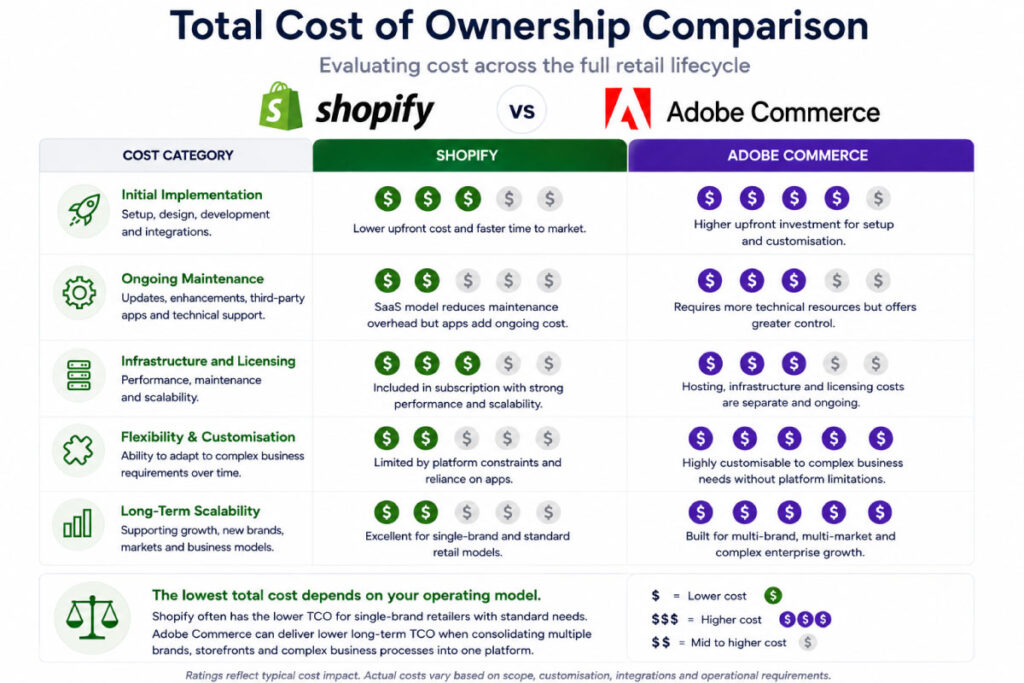
Shopify Plus will generally have a lower initial and ongoing technical cost than a comparable Adobe Commerce PaaS implementation.
The SaaS model removes many expenses associated with:
- Infrastructure management
- Platform patching
- Core software upgrades
- Performance tuning
- Deployment architecture
- Security maintenance at the application infrastructure level
However, Shopify’s total cost can increase dramatically as more independent stores are introduced.
Potential duplicated costs include:
- Applications charged per store
- Theme licences
- Integration services
- Product synchronisation
- Content maintenance
- Quality assurance
- Store-specific development
Shopify confirms that applications are billed per expansion store and that production stores require individual theme licences.
Adobe Commerce typically involves a higher implementation cost and greater ongoing development responsibility.
However, a multi-brand group may be able to consolidate several storefronts onto one codebase, Admin, integration layer and release process.
For a sufficiently complex retailer, the relevant comparison may not be:
One Shopify store versus one Adobe Commerce store.
It may instead be:
Five independent Shopify stores versus a single multi-website Adobe Commerce implementation.
The second comparison can produce a very different total cost result. With this in mind, we recommend reading our guide on “How to Calculate the Total Cost of Ownership (TCO) of an eCommerce Platform“.
Verdict
Shopify Plus usually has the lower total cost for a standardised retail operation.
However, Adobe Commerce can become commercially attractive where its multi-website architecture replaces several separate platforms, integrations and development environments.
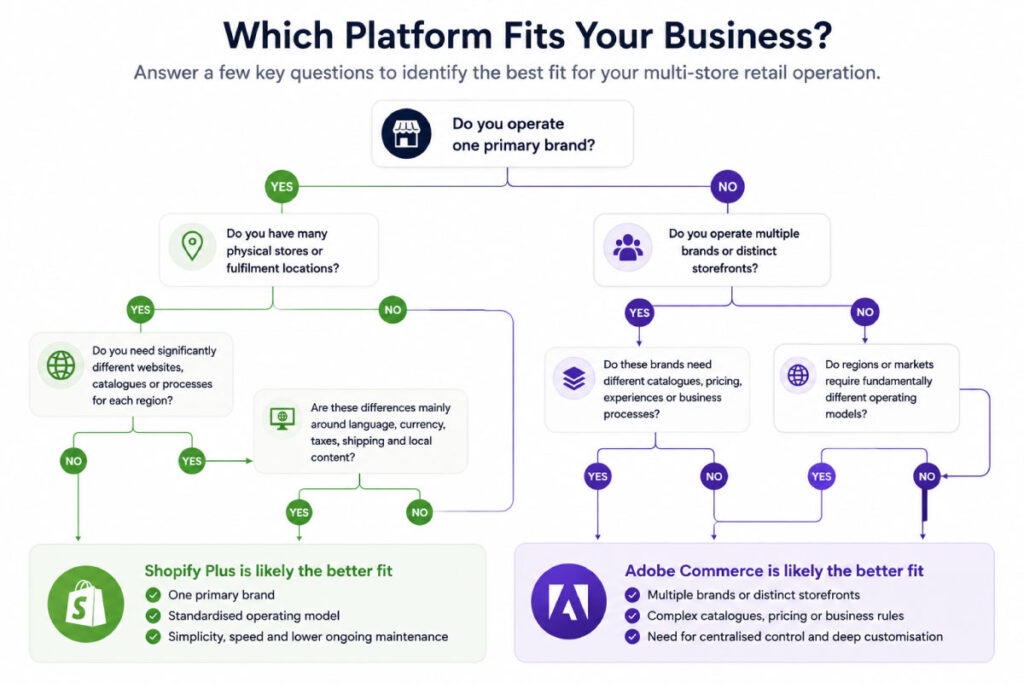
When Should a Multi-Store Retailer Choose Shopify Plus?
Shopify Plus is likely to be the better choice when:
- You operate one primary brand
- You have many physical retail locations
- Shopify POS is suitable for your stores
- Most regions share the same product and operating model
- Shopify Markets can handle the required localisation
- You want to launch quickly
- You want to minimise platform maintenance
- Your workflows can use standard platform features and applications
- Individual brands or storefronts should remain operationally separate
- Your team values ease of administration over deep platform control
A large number of physical locations does not automatically make Shopify unsuitable.
A retailer with 100 stores may still have a relatively straightforward commerce model if all locations operate under the same brand, catalogue, pricing model and systems architecture.
When Should a Multi-Store Retailer Choose Adobe Commerce?
Adobe Commerce is likely to be the better choice when:
- You operate several distinct brands
- You want those brands managed within one commerce implementation
- Websites require substantially different catalogues
- Pricing differs by website or business unit
- You require complex product or promotional logic
- You have highly customised fulfilment requirements
- Your ERP and operational workflows require bespoke integration
- Different regions have fundamentally different business processes
- You need extensive control over the application and data model
- You have the budget and internal capability to govern a more complex platform
Adobe Commerce should not be selected solely because a business is large.
Its value is strongest when the retailer’s complexity creates a genuine need for the platform’s flexibility.
Questions to Ask Before Selecting a Platform
Before choosing Shopify Plus or Adobe Commerce, document the answers to the following questions:
- Are we managing physical locations, separate websites, separate brands or all three?
- Can our regional experiences be handled through one storefront?
- Which products and prices must differ between brands or markets?
- Do customers need one account across every storefront?
- Which system owns products, inventory, customers and orders?
- Will stores fulfil online orders?
- Do we require click and collect or inventory transfers?
- How will returns work across physical and online channels?
- Are integrations shared across all brands?
- How many separate development and release processes can we support?
- Which configurations must be centrally controlled?
- What level of platform maintenance can our business sustain?
- Are we comparing one platform instance or several separate storefronts?
- What will the operating model look like in three to five years?
The answers should be incorporated into a platform requirements matrix before demos or commercial proposals are requested.
Shopify Plus vs Adobe Commerce: Which Is Better?
Neither Shopify Plus nor Adobe Commerce is universally better for multi-store retail.
Shopify Plus is generally better for operationally standardised retailers that want a fast, scalable and lower-maintenance SaaS platform.
Adobe Commerce is generally better for complex retail groups that need to manage multiple differentiated brands, catalogues and business models through a central commerce architecture.
The number of stores is rarely the deciding factor.
The more important considerations are:
- How different each storefront needs to be
- Whether data should be shared or isolated
- How inventory and fulfilment operate
- Which systems control core retail data
- How much custom business logic is required
- How the organisation wants to manage technology
A well-designed Shopify Plus architecture can support a significant retail network without unnecessary complexity.
A well-designed Adobe Commerce architecture can consolidate a highly complex multi-brand group into one manageable commerce ecosystem.
The wrong architecture on either platform can result in duplicated administration, fragile integrations and escalating operating costs.
How OSE Can Help
OSE works with both Shopify Plus and Adobe Commerce, allowing our recommendations to be based on the retailer’s requirements rather than a predetermined platform preference.
Our multi-store eCommerce services include:
- Platform selection
- Solution architecture
- Multi-brand and multi-region planning
- ERP, POS and OMS integration
- Product and inventory data architecture
- Click-and-collect workflows
- Store-level inventory visibility
- Adobe Commerce development
- Shopify Plus development
- Replatforming and migration
- Long-term platform support
Before recommending a platform, we assess how products, inventory, customers, pricing and orders move across the wider retail ecosystem.
This ensures the selected platform supports both the immediate eCommerce project and the retailer’s longer-term operating model.