


Pronto Connect gives an eCommerce platform a route into Pronto Xi’s operational data and business processes. The quality of that connection becomes visible when a trade customer sees their agreed price, a store advertises stock it can supply, or an online order reaches the right fulfilment team.
For Australian and New Zealand retailers and distributors, Pronto Connect best practices start with clear transaction rules. The implementation needs to preserve account context, control repeated requests and make incomplete exchanges visible to the people responsible for trading.
This article sets out a practical delivery methodology for teams commissioning, building or reviewing a Pronto Connect integration. It focuses on the API boundary and operational controls. For platform selection and broader scope, see our Pronto Xi eCommerce integration guide.
Key Takeaways
- Verify API operations, permissions and response behaviour against your Pronto Xi environment.
- Define pricing, availability and order acceptance rules before development.
- Make retries safe and reconcile commerce orders with Pronto acceptance.
- Test outages, customer boundaries and operational recovery before launch.
What Pronto Connect provides

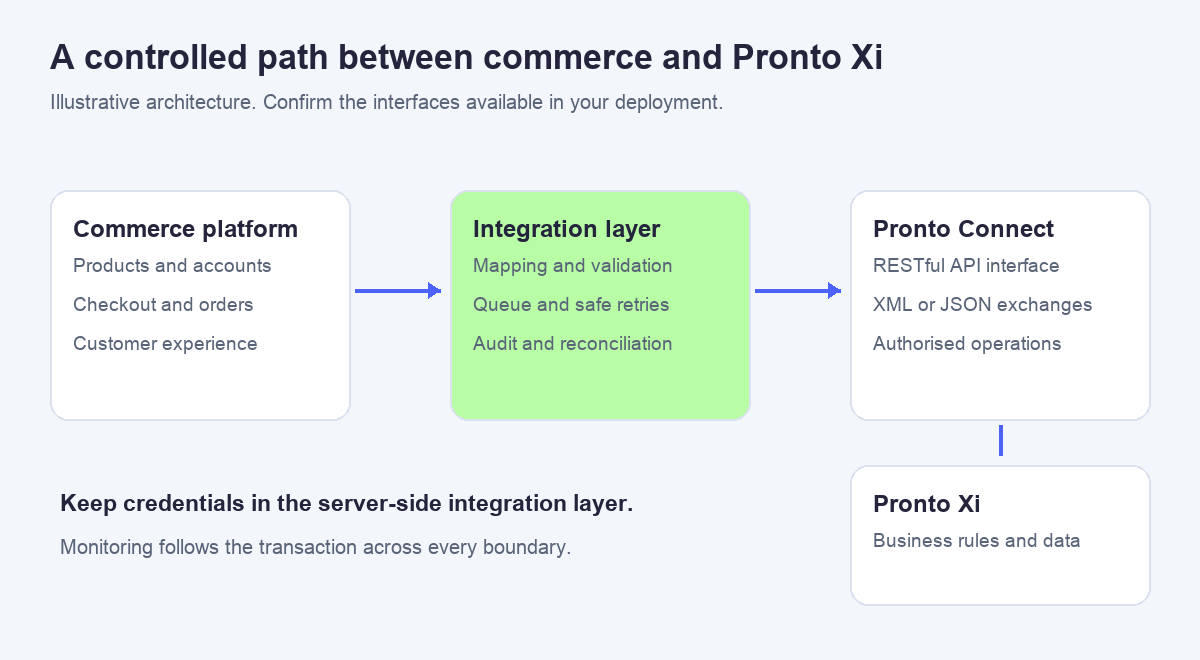
Pronto Connect is Pronto Software’s API integration platform for connecting external applications with Pronto Xi. Pronto describes pre-built RESTful APIs, support for custom API development, XML and JSON documents, incoming web services calls, outbound HTTPS calls through Runtime and user-based security. Explore Pronto’s API integration platform.
Begin with the operations available in the customer’s environment. Confirm the Pronto Xi release, enabled modules, API deployment, customisations and support arrangements with the Pronto team. Obtain the actual request and response specifications, permitted operations and representative data before committing to a build estimate.
For each operation, establish its authentication requirements, mandatory fields, business validations, response envelope, size limits and failure behaviour. Record whether pagination, change queries or duplicate detection are supported. These capabilities must be verified for the deployed interface. A connector’s product name alone leaves too much implementation detail unresolved.
1. Turn business requirements into API contracts
An API contract should describe the meaning of a transaction alongside its structure. For an order, identify the selling entity, customer account, delivery destination, warehouse selection, currency, payment state and external reference. Agree which values are supplied and which Pronto derives or validates.
Create a small set of representative requests and expected responses for each operation. Include a successful exchange, a rejected business rule and an uncertain outcome such as a connection timeout. Preserve these examples with the mapping specification so changes can be reviewed against a stable baseline.
During discovery, select difficult records deliberately. A stock item sold in cartons, a customer with several delivery locations and an order containing a promotional adjustment reveal more than a clean single-line example. Finance and operations should approve the expected result before developers encode the mapping.
2. Give every field an owner and preserve its context
Assign one authoritative owner to each exchanged field. Pronto Xi may control item identity, account status and operational prices, while a commerce platform or PIM controls descriptions and imagery. Document how updates reach the destination and how the integration protects fields maintained there.
Keep identifiers explicit. An item code, barcode, commerce product ID and variant ID are different references. The same principle applies to debtor accounts, company locations, warehouses and branches. Where several Pronto instances are involved, qualify identifiers with their source environment or business entity to avoid collisions.
Mappings should specify decimal precision, units of measure, date formats, time zones and the treatment of empty values. An omitted field can mean something different from a deliberate instruction to clear it. Test both. Record how discontinued items, account closures and deleted records are communicated through the supported interface.
3. Design pricing and availability around the buying decision
A request for a price needs sufficient commercial context. Determine whether the calculation depends on customer, delivery location, quantity, unit, branch, currency, date or promotional eligibility. Compare representative baskets with the result approved by the business, including tax, rounding and freight treatment.
If prices are cached, key the cache by every input that can change the result. Define expiry and invalidation when an account, agreement or price changes. Include a test proving that one customer cannot receive another customer’s commercial terms through a shared cache or session transition.
For inventory, agree what the website promises. Physical on-hand quantity, available-to-promise stock and stock eligible for a selected fulfilment location can differ. Define reservations, safety buffers, transfers and backorders with the operations team. The API mapping should implement that approved rule consistently.
Set a maximum acceptable age for each data flow. Product copy may tolerate a scheduled refresh, while a price or stock decision at checkout may require fresher validation. Agree what customers see when the latest value cannot be confirmed, and which orders require review. These policies should be explicit acceptance criteria.
4. Protect order creation from duplicate processing
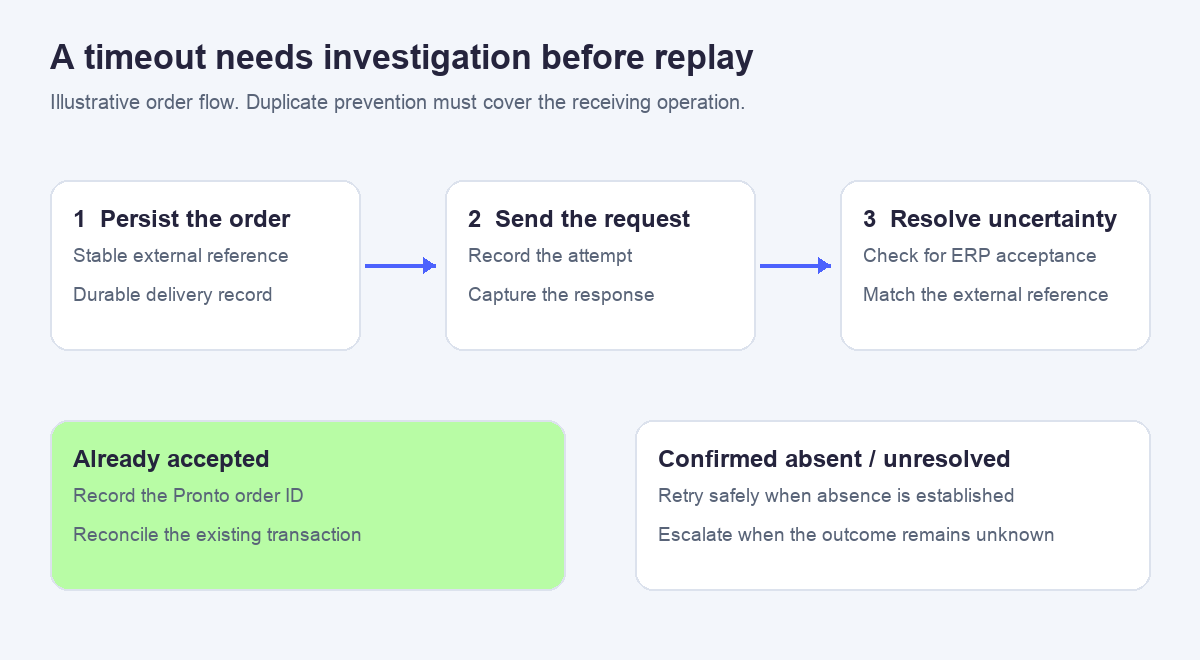
An order request can reach Pronto successfully even when its response never reaches the caller. Retrying immediately may create a second order. A durable delivery record should distinguish an accepted transaction, a confirmed rejection and an outcome that remains unknown.
Assign a stable external order reference and persist it before delivery. Where the receiving API supports an idempotency mechanism, verify its scope and behaviour under concurrent requests. Otherwise, design a supported lookup and duplicate-prevention process with the Pronto team, including how uncertain acceptance is resolved.
A middleware lookup alone can race with another worker. Control concurrency for the same external reference, and establish where uniqueness is enforced at the receiving boundary. If acceptance cannot be established safely, place the transaction in an exception queue for investigation before replay.
Track commercial states separately. Payment authorisation, payment capture, commerce order creation and ERP acceptance are distinct events. Persist the Pronto order reference after acceptance and reconcile it with the commerce order and payment record. This gives support staff an auditable route through a failed exchange.
5. Control workload, retries and recovery
Choose synchronous calls for operations that genuinely need an immediate response. Use durable background processing where work can complete after the customer interaction. A queue can absorb bursts, retain pending work and give operators a controlled way to pause delivery during an outage.
Measure API response times and agree concurrency, batch sizes and timeout budgets with the team responsible for Pronto. Respect the limits of the actual deployment. A full catalogue refresh should not consume the capacity required for orders or time-sensitive account checks.
Classify failures before retrying. Temporary connectivity problems may justify bounded retries with increasing delays and randomised timing. Invalid account mappings and rejected business rules require correction. Limit automatic attempts, surface exhausted work and control backlog recovery so it does not overwhelm a recovering service. AWS explains the engineering principles behind timeouts and retries.
For incremental synchronisation, persist a checkpoint only after the relevant batch is durably handled. Define how to catch changes around the checkpoint boundary, reject stale updates and reconcile after downtime. Where the interface lacks a reliable change feed, agree a supported comparison process rather than silently assuming records are current.
6. Make security and reconciliation part of operations
Keep Pronto credentials in a controlled server-side integration environment. Use dedicated identities with the permissions required for their assigned operations, verified against the deployment’s authentication model. Separate production and test access, protect transport with HTTPS and certificate validation, and establish credential rotation and revocation procedures.
Logs should record a correlation reference, operation, source system, time, outcome and useful diagnostic context. Redact credentials and minimise personal and commercial data in payload logs. Restrict access and define retention so troubleshooting does not create an uncontrolled copy of customer records.
Monitor business exceptions as well as technical availability. Useful signals include the oldest undelivered order, repeated price failures, inventory freshness, unmatched references and outstanding reconciliation differences. An alert needs an owner, response expectation and documented recovery procedure.
Reconcile orders, lines, quantities, tax, discounts, freight and payment treatment across systems. Investigate mismatches by reference and age. A successful HTTP exchange establishes transport success, while a parsed business response and reconciliation provide evidence that the intended operation completed correctly. Our ERP integration recovery guide explores the operational consequences in more detail.
Pedders mini-case study

OSE’s work with Pedders Suspension & Brakes demonstrates the operational context behind enterprise Pronto integration. The Adobe Commerce project connected vehicle-based product discovery, store discovery and service enquiry pathways across a national network of more than 120 retail locations.
Multiple Pronto instances connect catalogue information, pricing and operational workflows across head office and the store network. The experience also brings together PartsDB vehicle fitment information and UNBXD search, helping customers research relevant products and move towards a local service conversation.
This scope illustrates why an integration design needs explicit environment identity and consistent commercial rules across customer touchpoints. A national customer experience depends on how the catalogue, store context and operational systems work together. Read the Pedders Adobe Commerce case study for the published project detail.
7. Use evidence to approve launch and future changes
A useful delivery methodology moves through discovery, contract validation, controlled implementation, business acceptance and operational handover. Each stage produces evidence the next team can use. Discovery produces the flow inventory and ownership decisions. Contract validation proves representative requests against the supported API environment.
Implementation should include repeatable manual checks using controlled test data. Business acceptance should follow a transaction through the customer experience, API exchange and resulting Pronto record. Involve the staff who will investigate problems after launch so the support process is tested alongside the integration.
- Repeat an order request and verify that it produces one accepted business transaction.
- Interrupt the connection after sending an order and prove how acceptance is established.
- Change an account or price and verify customer-specific values and cache isolation.
- Simulate stale stock, partial fulfilment and a rejected order line.
- Pause delivery, accumulate a backlog and demonstrate controlled recovery.
- Reconcile financial values and confirm an operator can trace and resolve an exception.
Release the approved version through staging, retain the previous working configuration and define rollback criteria. If rollback follows accepted transactions, reconcile those records before replaying pending work. Assign ownership for API changes, credential maintenance, monitoring and updates to mapping rules.
For upgrades, re-run the agreed acceptance pack against the revised environment. Review changed response fields, validations, permissions and performance before production deployment. Integration reliability depends on maintaining the contract as both Pronto and the commerce platform evolve.
Plan your Pronto Connect integration with OSE
OSE works with businesses whose commerce requirements depend on ERP data, customer-specific rules and connected operations. We can help define Pronto integration scope, validate the required interfaces and design the delivery, monitoring and support processes around your business.
Bring your Pronto Xi version, current commerce platform, required data flows and examples of the transactions causing difficulty. That gives discovery a concrete starting point for identifying standard API coverage and any custom development required. Explore OSE’s Pronto integration services or discuss your requirements with our team.
Frequently asked questions
Pronto Connect is Pronto Software’s API integration platform for connecting external applications with Pronto Xi. It provides standard RESTful APIs and a development environment for custom APIs. The operations and permissions available to an integration need to be confirmed against the customer’s Pronto deployment.
Pronto’s platform documentation describes XML and JSON document exchanges. Confirm the format, schema, mandatory fields and business response for each API operation used in your environment.
An integration can use Pronto Connect alongside the commerce platform’s supported interfaces. Feasibility depends on the required operations, enabled API capabilities, business rules and platform configuration. Validate customer pricing, account structures, inventory and order processing during discovery.
Use a stable external reference, a durable delivery record and a verified duplicate-prevention mechanism at the receiving operation. After a timeout, establish whether the order was accepted before replaying it. Test concurrent deliveries and escalate outcomes that cannot be resolved safely.
Custom API development depends on the fit between the required workflow and the standard operations available in the deployed environment. Map requirements to existing capabilities first, then document specific gaps, ownership and upgrade responsibilities for any custom work.