


A shopper finds a replacement filter that looks like the one at home. Another adds a battery beside a cordless tool. A third buys a monitor arm after checking the screen size. Each basket can look sensible while the relationship between the products remains unverified.
For hardware, appliance and consumer-electronics retailers, product compatibility is a customer decision and a data-management problem. A popular accessory is not necessarily suitable for the model someone owns. A familiar brand name or matching photograph cannot resolve every version, connection or installation requirement.
This guide explains how to connect compatibility information with product discovery, product pages and basket checks. It helps eCommerce and technology leaders decide whether curated relationships are sufficient or whether their catalogue needs a governed compatibility service. The objective is to give shoppers dependable information without turning uncertain matches into confident promises.
Key Takeaways
- Separate verified compatibility from recommendations and unknown matches.
- Keep model identifiers, conditions and evidence with each relationship.
- Test discovery, variant changes and basket behaviour before expanding coverage.
Define what a compatibility claim actually means
Start with the question the customer needs answered. “Will this filter fit my machine?” differs from “Is this a useful accessory?” or “Could I choose this instead?” Those questions require different evidence and should produce different messages.
A confirmed fit should refer to an identified product or model and any conditions that matter. A related item might simply share a category. A replacement may require additional checks before it can take the place of an older part. Give each relationship a clear meaning before deciding how to display it.
Avoid a single compatible flag that applies everywhere. A relationship can depend on model revision, region, configuration or another component. Capture the conditions that your category specialists can substantiate, and keep them understandable to shoppers.
Set a policy for unknowns. Missing evidence does not establish either a match or a mismatch. When the required model or condition is unavailable, the interface should ask for more information or offer a useful support route. It should not quietly convert absence of data into a green tick.
Choose an initial category using evidence from support enquiries, return reasons and difficult purchases. Identify where compatibility uncertainty is commercially important and where the business has enough dependable source material to improve the experience. Do not begin by promising coverage of every product.
Identify the product the customer already owns
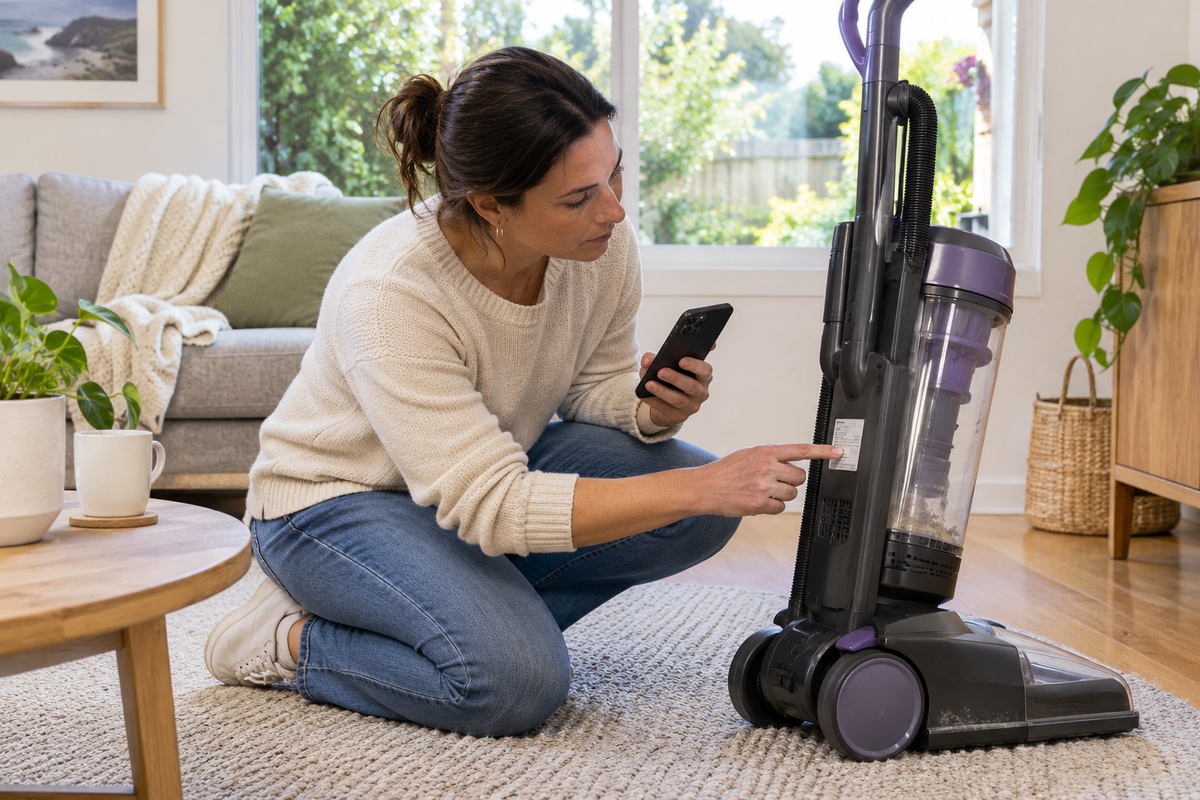
The lookup needs a dependable starting point. A marketing name may cover several generations, while the number on a receipt may be the retailer’s SKU rather than the manufacturer’s model. Show customers where to find the identifier that the matching process actually uses.
Keep manufacturer, model, variant and retailer identifiers distinct. GS1’s GTIN explanation describes an identifier for a predefined trade item. Use identity information to establish which item is involved; the retailer still needs evidence for the relationship between that item and an accessory.
Provide help beside the entry field: an example of the expected identifier, a relevant label photograph where available, and an explanation of ambiguous results. If the input matches several models, ask the customer to confirm the right one rather than selecting the first result.
Dyson’s New Zealand spare-parts page offers a useful public example of starting with the machine: it directs shoppers to find their machine before exploring the appropriate parts journey. This illustrates an identification approach, not a claim about Dyson’s internal data architecture or an OSE client relationship.
Allow shoppers to change or clear their selection. A household or trade customer may own several machines. A remembered model should remain visible, and changing it should trigger a fresh compatibility check for the products under consideration.
Model relationships separately from ordinary attributes
Product attributes describe an item. Compatibility connects that item with something else under defined conditions. A battery’s dimensions and published specifications may be relevant inputs, but they do not by themselves establish suitability for every tool that appears similar.
Create a relationship record with a source item, target item or model, relationship type, conditions, evidence source, status and accountable owner. Include the date or source revision that was reviewed. Use stable identifiers rather than names that can change during catalogue editing.
Decide whether the relationship is directional. An accessory may fit a machine without the machine being an accessory for that part. Similarly, a superseding item might replace an older product only under specified conditions; that does not necessarily make the reverse substitution valid.
For a small, stable range, a curated list may be manageable. For a large catalogue with many overlapping model families, a separate relationship dataset may be easier to govern. The decision should follow update frequency, conditional rules and ownership, not the appeal of adding another platform.
Our product data guide explains the wider catalogue foundation. Compatibility work adds explicit relationships and evidence to that foundation rather than burying every answer in a description field.
Give confirmed, excluded and unknown matches different behaviour
Use a simple status model that business owners can approve. Keep confirmed matches, known exclusions and insufficient information separate through the data pipeline and the customer interface. Reserve the right to withhold an answer when the evidence is incomplete.
| State | Evidence position | Customer response |
|---|---|---|
| Confirmed match | The identified model meets the documented relationship conditions | State the match and show any conditions that still apply |
| Known exclusion | Reviewed information explicitly rules out the selected combination | Explain the mismatch and offer a verified alternative if available |
| Unknown | The model, conditions or evidence are incomplete | Ask for the missing detail or route the question to a specialist |
An illustrative filter lookup makes the distinction concrete. A customer selects Model A, but the filter record covers only Model B. Unless the evidence defines that coverage as an exclusive list, the absence of Model A does not prove incompatibility. It means the service cannot yet confirm the match.
Agree the purchasing policy for each state and category. Some situations may warrant blocking a claim or a purchase until reviewed; others may permit purchase with a clear explanation. Category and product specialists should determine the appropriate policy. The implementation team should not invent technical suitability rules.
Put compatibility into search and product discovery
A model selector is useful only if the selected context reaches the product results. Pass the confirmed model identifier into search and filtering, then make the active selection visible. Explain whether results are confirmed matches, general suggestions or a mixture.
Do not let a zero-result screen blur two different situations: no eligible product exists in the range, or the catalogue lacks enough information to answer. Offer an appropriate next step, such as checking the model, contacting a specialist or viewing a category without the compatibility restriction.
Keep commercial ranking within the approved eligibility rules. Promoting a high-margin accessory should not move it into a confirmed-fit list when the relationship has not been established. Separate the question of which products qualify from the order in which qualifying products appear.
Our product filtering guide covers category-specific discovery controls, while our search engine selection guide explains broader evaluation requirements. For compatibility, ask suppliers to demonstrate model context, conditional matching and honest handling of incomplete data using your own representative records.
Check the route from external search too. A customer may arrive directly on an accessory page without using your model selector. That page needs a way to identify the relevant machine or product before presenting a personalised fit claim.
Keep recommendations separate from verified compatibility

Recommendations can help shoppers discover accessories, alternatives and additional purchases. Their presence in a carousel does not establish that the retailer has validated a technical relationship. Label and govern these experiences according to what the data actually supports.
Shopify’s Search & Discovery documentation distinguishes complementary products from related products and allows merchants to choose recommendations manually. It also describes automatically generated related recommendations using signals such as purchase history, descriptions and collections. Those mechanisms should not be treated as a compatibility verdict without separate supporting evidence.
Adobe Commerce’s related-product settings provide controls for selecting products to show alongside an item. A retailer can use merchandising controls to present reviewed relationships, but must still govern the evidence and conditions behind any fit claim. Feature names alone do not prove that a complete compatibility process exists.
For a curated range, the platform’s product relationships and suitable storefront presentation may be enough. For conditional or extensive matching, evaluate an additional dataset, service or extension. Specify the target platform, implementation approach, administrative workflow and failure behaviour before estimating the work.
If AI helps extract model references from supplier documents, treat the output as proposed data until the agreed review process accepts it. A generated explanation should not invent a fit when the approved relationship service returns unknown.
Preserve the selected model through product and basket changes

On the product page, show which model was checked and what the result means. Keep important conditions near the purchase decision. A long list of model names hidden in a downloadable document should not be the only explanation of a prominent compatibility claim.
Recheck when the selected variant changes. An accessory offered in different sizes or configurations may not share the same relationships across every variant. A result calculated for one SKU should not remain attached to another simply because the product page did not reload.
The basket introduces another distinction: an accessory intended for a newly purchased product versus one intended for equipment already owned. Ask only the questions needed to establish that relationship, and avoid assuming that every accessory belongs to every main item in a multi-product basket.
Retain enough context with the order for customer service to understand what was checked. Record the selected model, accessory identifier and relevant rule version where appropriate. This supports investigation when product data changes after purchase without implying that every completed order needs to be reprocessed.
Test direct links, saved baskets, repeat purchases and customers changing devices. A shopper who skips the selector should receive the correct unknown state, not a compatibility result inherited from an unrelated browsing session.
Connect catalogue updates without losing the evidence
Assign ownership by information type. The ERP may own stock codes and sale availability, while a product information team or supplier source owns compatibility relationships. Document how those records map together and who resolves a disagreement.
Require new and changed data to pass validation before publication. Check missing identifiers, duplicate relationships, contradictory statuses and references to retired models. Where a family-level rule expands into many model relationships, verify both the inclusion logic and any exceptions.
Use controlled publishing and a recoverable history. If a supplier withdraws a relationship or a review finds an error, the business needs to identify the affected pages and recommendations, correct the active data and assess any customer follow-up under its policies.
Define what happens when a feed or matching service fails. Retaining a last-reviewed dataset may be appropriate under an agreed freshness policy; silently publishing an incomplete feed as a complete replacement is a different decision. Make the active dataset and its status visible to the operating team.
For businesses serving Australia and New Zealand, confirm whether the same model references and conditions apply in both catalogues. Share records where justified, but do not assume that similar product names establish identical regional suitability. Use the relevant manufacturer information and local range ownership.
Pilot the difficult cases before expanding coverage
Create an acceptance pack with confirmed matches, explicit exclusions and unknowns. Include ambiguous model names, a variant change, a retired product, a corrected supplier record and an unavailable matching service. The expected customer message should be documented for every case.
Test the administrative journey as well as the storefront. Ask a product specialist to add a relationship, review evidence, correct an exclusion and publish a change. Then check search, recommendations, product pages and the basket for consistent results.
Use actual return and support classifications to establish the baseline. Separate wrong-model purchases from damaged goods, change of mind and other causes. Track the proportion of the priority range with reviewed coverage, unknown-result frequency and the support work required to resolve it.
Measure commercial outcomes after the pilot rather than promising them in advance. Compare similar categories and periods, allowing for range, stock and promotional changes. More accessory purchases alone does not establish a better outcome if suitability complaints or return costs rise alongside them.
Scope the investment around ownership and customer decisions
A compatibility project should produce more than a selector. Useful deliverables include a relationship model, evidence policy, accountable owners, source mappings, customer states and an acceptance pack. Ask your delivery partner to make those outputs reviewable before the business commits to wider rollout.
The implementation may use existing Shopify or Adobe Commerce controls, a product-data integration or a dedicated matching capability. Compare the options against catalogue complexity, source quality, update frequency and the operating team’s capacity. Include maintenance and review effort alongside development cost.
OSE’s product discovery, customer experience and integration work can connect the approved relationship data with the shopping journey. The agency’s value should be visible in consistent behaviour, clear ownership and tested exceptions. Any reduction in wrong-item purchases or improvement in qualified sales must be demonstrated in the retailer’s own results.
If shoppers regularly ask whether an accessory will fit, discuss a product compatibility assessment with OSE. Bring a sample category, supplier evidence, recurring customer questions and examples of uncertain matches. They provide a practical basis for deciding whether curated data is sufficient or a broader integration is warranted.
Frequently asked questions
No. Related products can be alternatives or merchandising suggestions, depending on the platform and configuration. A compatibility claim needs evidence for an identified product or model and any relevant conditions. Make the distinction visible so a recommendation is not mistaken for a verified technical match.
Not always. A small, stable range may be managed through curated relationships and suitable storefront controls. Consider a separate service or dataset when conditional rules, overlapping model families and frequent updates exceed that approach. Include data review and ongoing ownership in the comparison.
Treat the result as unknown unless reviewed evidence establishes an exclusion. Ask for the missing identifier or offer a specialist support route. Do not claim that the item fits, or that it definitely does not fit, merely because a model is absent from an incomplete dataset.
AI can assist with extracting references or identifying records for review. The business still needs approved evidence, conditions and an accountable acceptance process. Customer-facing answers should follow the reviewed relationship data, including unknown states, rather than filling gaps with an unsupported confident recommendation.
Track reviewed range coverage, unknown results, compatibility-related enquiries and correctly classified wrong-model returns. Assess sales and margin alongside support and return costs. Compare similar ranges and periods, and verify that customer messages are accurate before attributing a commercial improvement to the new experience.