
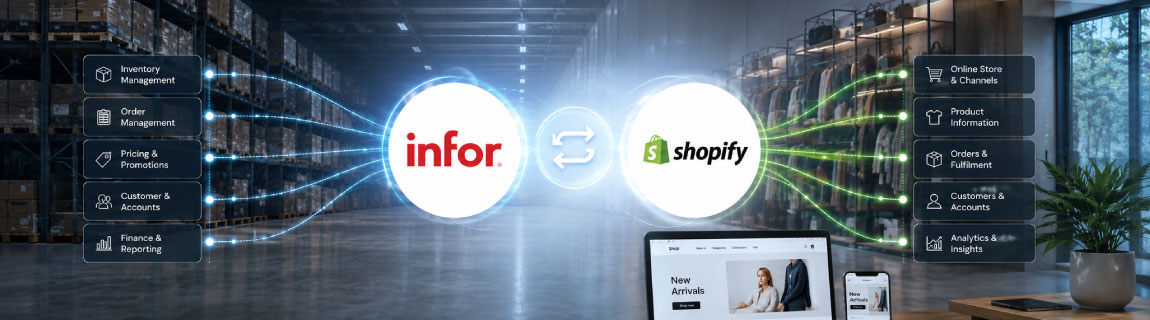

For retailers and distributors running Infor M3, launching or scaling a Shopify store is rarely just a front-end project.
With Shopify managing the customer experience, product discovery, checkout and account functionality, while Infor M3 remains responsible for critical operational data such as inventory, pricing, customers, orders, warehousing, fulfilment and finance.
The quality of the integration between the two platforms can therefore have a direct impact on customer experience, operational efficiency and the ability to scale.
A reliable Infor M3 and Shopify integration needs to do more than move data between systems. It must define which platform owns each data set, how frequently information should be exchanged, how exceptions are managed and how the architecture will support future business requirements.
What Does an Infor M3 and Shopify Integration Typically Handle?
The exact scope will vary between businesses, but most integrations involve several core data flows.
Product Data
Infor M3 may hold product identifiers, descriptions, categories, units of measure and operational product information.
Shopify generally requires richer, customer-facing content, including:
- Product titles and descriptions
- Images and media
- Variants
- Collections
- Search attributes
- Metafields
- SEO content
- Product availability
Some businesses choose to send core product data directly from Infor M3 into Shopify. Others use a product information management platform or a separate content layer to enrich product data before it reaches the storefront.
The right approach depends on where product content is currently maintained and how complex the catalogue is.
Inventory Availability
Inventory is one of the most important parts of the integration.
Infor M3 may manage stock across multiple warehouses, stores, branches or distribution centres. Shopify needs an accurate view of what can be sold online.
This does not always mean sending the exact physical stock figure to Shopify.
Many businesses apply availability rules that account for:
- Safety stock
- Reserved inventory
- Warehouse priority
- Store allocations
- Backorders
- Supplier availability
- Lead times
- Online-only stock
- Regional fulfilment rules
The integration should calculate a sellable quantity that reflects how the business actually fulfils online orders.
Pricing
Pricing can become complex when Infor M3 supports multiple customer types, regions, currencies, contract prices or promotional structures.
For a B2C Shopify store, the integration may only need to publish standard retail pricing and sale pricing.
For Shopify B2B, the integration may also need to manage:
- Customer-specific pricing
- Company-level pricing
- Volume pricing
- Contract pricing
- Price lists
- Customer groups
- Minimum order quantities
- Pack sizes
- Units of measure
It is important to determine whether Shopify will store and apply the pricing rules, or whether pricing must be calculated in Infor M3 and returned to Shopify.
Customer and Company Accounts
For a standard B2C store, customer records may be created in Shopify and passed into Infor M3 when an order is placed.
B2B integration is usually more involved.
The integration may need to synchronise:
- Company accounts
- Customer contacts
- Account status
- Trading terms
- Credit limits
- Sales representatives
- Delivery addresses
- Customer-specific catalogues
- Tax settings
- Pricing groups
The ownership of customer data must be clearly defined. In many cases, Infor M3 remains the system of record for approved trade accounts, while Shopify manages the digital account experience.
Orders
Orders placed in Shopify usually need to be sent into Infor M3 for allocation, fulfilment, invoicing and financial processing.
The order integration may include:
- Customer details
- Products and quantities
- Pricing
- Discounts
- Tax
- Shipping charges
- Payment details
- Purchase order numbers
- Delivery instructions
- Warehouse selection
- Fulfilment method
- Order source
The integration should also account for failed orders, duplicate submissions, invalid products, pricing discrepancies and unavailable stock.
Simply posting an order into the ERP is not enough. The process needs clear validation, logging and retry logic.
Fulfilment and Order Status
Once an order is processed in Infor M3, fulfilment information can be returned to Shopify.
This may include:
- Order confirmation
- Allocation status
- Shipment status
- Tracking numbers
- Carrier details
- Partial fulfilments
- Backorder information
- Cancellation status
- Invoice references
Returning accurate status information to Shopify helps customers understand what is happening with their order and reduces manual customer service enquiries.
Infor M3 and Shopify Integration Architecture
There are several ways to connect Infor M3 with Shopify.
The right choice depends on transaction volume, system complexity, internal capability and the number of platforms involved.
Direct API Integration
A direct integration connects Shopify to Infor M3 using the available APIs in each platform.
This can work well when:
- The integration scope is limited
- Data flows are relatively simple
- Only two systems are involved
- Transaction volumes are manageable
- The business has strong internal technical capability
- There is limited need for transformation or orchestration
A direct approach can reduce the number of platforms involved, but it can also create a tightly coupled solution.
As requirements expand, the integration may become difficult to maintain. Changes in one system can affect the other, and managing retries, queues, logging and exception handling may require additional custom development.
Middleware Integration
Middleware sits between Infor M3 and Shopify and manages the exchange of data.
This architecture can be useful when the integration requires:
- Complex data transformation
- Multiple systems
- High transaction volumes
- Message queuing
- Scheduled processing
- Real-time and batch workflows
- Centralised monitoring
- Retry logic
- Exception handling
- Reusable integration services
Middleware can also help separate Shopify from the internal structure of Infor M3.
Instead of Shopify connecting directly to multiple ERP services, the middleware can expose a consistent integration layer and manage how data is translated and delivered.
For larger retailers and distributors, this can provide a more scalable and supportable architecture.
Infrastructure-Driven Integration
Some organisations build a custom integration layer using cloud infrastructure such as AWS or Microsoft Azure.
This may involve:
- APIs
- Serverless functions
- Message queues
- Databases
- Event processing
- Scheduled jobs
- Monitoring services
- Centralised logging
- Alerting
This approach offers a high level of control and can be designed around the exact needs of the business.
It is often suitable when the integration must support multiple storefronts, regions, systems or operational workflows.
However, it also requires strong development, security and support processes.
Real-Time vs Scheduled Data Synchronisation
Not every data flow needs to operate in real time.
A good integration design uses real-time processing where speed is important and scheduled processing where a delay is acceptable.
Real-Time or Near Real-Time Data
Real-time processing may be appropriate for:
- Orders
- Payment confirmation
- Critical inventory updates
- Account validation
- Customer-specific pricing
- Order status
- Fulfilment updates
Scheduled Data
Scheduled jobs may be suitable for:
- Large catalogue updates
- Product descriptions
- Category assignments
- Images
- Historical order data
- Customer account refreshes
- Bulk price updates
The goal is not to make every process immediate. It is to create an integration that is responsive where necessary without placing unnecessary load on either platform.
Supporting Multiple Warehouses and Locations
Infor M3 is often used by businesses with complex inventory and fulfilment models.
Shopify can represent multiple locations, but the relationship between Shopify locations and Infor M3 warehouses needs to be carefully designed.
Questions to consider include:
- Will each Infor M3 warehouse map to a Shopify location?
- Should store stock be available online?
- Which location should fulfil each order?
- Can orders be split across warehouses?
- Are some products restricted to certain regions?
- Should online inventory include supplier or backorder stock?
- How are click and collect orders managed?
- How are returns handled?
These decisions affect both the technical integration and the customer experience.
Infor M3 Integration for Shopify B2B
Shopify B2B can provide company accounts, customer permissions, catalogues, payment terms and other trade functionality.
However, Infor M3 may still hold the source data for many of these requirements.
A Shopify B2B integration may need to support:
- Approved company accounts
- Multiple buyers per company
- Customer-specific catalogues
- Contract pricing
- Credit terms
- Purchase order numbers
- Account balances
- Sales representative relationships
- Order approval workflows
- Units of measure
- Pack quantities
- Customer-specific delivery rules
The project should clearly define which rules will be managed in Shopify and which will remain in Infor M3.
Trying to reproduce every ERP rule inside Shopify can create unnecessary complexity. In other cases, relying on real-time ERP calls for every interaction can slow down the buying experience.
The best solution often uses a combination of synchronised data and real-time validation.
Integration Monitoring and Exception Management
Integration failures will happen.
A product may be missing. An order may contain invalid data. A customer account may be inactive. A warehouse may reject an order. An API may be temporarily unavailable.
The integration must make these issues visible.
A reliable solution should include:
- Centralised logging
- Error classification
- Automated retries
- Duplicate prevention
- Failed message queues
- Operational dashboards
- Alerts
- Manual reprocessing
- Clear ownership of exceptions
Without this capability, failed transactions can remain unnoticed until a customer contacts the business.
Monitoring should be treated as a core integration requirement, not an optional addition.
Common Infor M3 and Shopify Integration Challenges
Unclear Data Ownership
Projects often encounter problems when both systems are allowed to update the same data.
Each data set should have a defined system of record.
For example, Infor M3 may own inventory and account pricing, while Shopify owns merchandising content and customer-facing product descriptions.
Product Data That Is Not Ready for eCommerce
ERP product data is often designed for internal operations rather than online merchandising.
Product names may be abbreviated, attributes may be inconsistent and images may be stored elsewhere.
A data enrichment process may be needed before the catalogue is suitable for Shopify.
Complex Pricing Rules
Infor M3 pricing structures may not map directly to Shopify.
The business may need to simplify pricing rules, pre-calculate prices, use Shopify B2B catalogues or build a custom pricing service.
Inventory Mismatches
Sending raw warehouse stock into Shopify can lead to overselling or poor allocation decisions.
Availability should reflect reservations, buffers and fulfilment rules.
Limited Error Visibility
An integration may technically move data, but still fail operationally if staff cannot see or resolve errors.
Monitoring, alerting and support processes must be designed from the beginning.
Over-Customising Shopify
Some businesses attempt to recreate large parts of the ERP inside Shopify.
This can increase maintenance costs and make future Shopify upgrades more difficult.
The storefront should manage the digital commerce experience, while the ERP continues to manage the operational processes it is designed for.
A Recommended Integration Delivery Process
A structured discovery and delivery process reduces the risk of missed requirements.
1. Define Business Processes
Document how products, inventory, pricing, customers, orders and fulfilment currently operate.
This should include exception scenarios, not just the ideal process.
2. Confirm Data Ownership
Define which platform owns each data set and where updates can be made.
3. Map the Data
Map fields, identifiers, statuses and business rules between Infor M3 and Shopify.
4. Select the Architecture
Determine whether the solution should use direct APIs, middleware or a custom cloud integration layer.
5. Design the Error Process
Define how failed transactions will be identified, retried, corrected and reprocessed.
6. Build in Stages
Start with foundational data flows such as products, inventory and orders before adding more advanced functionality.
7. Test Operational Scenarios
Testing should include:
- Partial fulfilments
- Cancelled orders
- Invalid products
- Out-of-stock items
- Duplicate orders
- Customer-specific pricing
- Multiple warehouses
- Failed API calls
- Returns
- Backorders
8. Monitor After Launch
The integration should be actively monitored after go-live to identify data issues, performance problems and edge cases.
Questions to Ask Before Integrating Infor M3 with Shopify
Before beginning the project, businesses should answer the following questions:
- Which system owns product data?
- Where will product content be enriched?
- How will Shopify inventory be calculated?
- Are multiple warehouses or stores involved?
- Does the business require B2B pricing?
- How frequently must each data flow run?
- Will orders be allocated before they enter Infor M3?
- How will partial fulfilments be handled?
- What happens when an order fails?
- Who will monitor the integration?
- Are other systems involved, such as a PIM, CRM, POS, OMS or warehouse platform?
- Will the architecture need to support multiple Shopify stores?
- How will future changes be deployed and tested?
These questions help determine the true size and complexity of the integration.
Integrating Infor M3 with Shopify Through OSE
OSE designs and supports eCommerce integrations for retailers and distributors operating complex ERP, warehouse and fulfilment environments.
Our work can include:
- Shopify and Shopify Plus development
- Infor M3 integration architecture
- Product, pricing and inventory integration
- B2B customer and company account integration
- Order and fulfilment workflows
- Middleware and cloud integration services
- Multi-store and multi-warehouse solutions
- Integration monitoring and exception management
- Long-term support and optimisation
The objective is not simply to connect Shopify and Infor M3. It is to create a dependable operating model that supports the customer experience, internal teams and future growth.
Planning an Infor M3 and Shopify Integration
Infor M3 and Shopify can work effectively together, but the success of the solution depends on the quality of the integration design.
The project should begin with a clear understanding of business processes, data ownership, operational rules and future requirements.
By choosing the right architecture and investing in monitoring, exception management and long-term support, businesses can create an integration that is reliable, scalable and easier to operate.